

Collabora Online
Available on the Marketplace
The app is listed on the Marketplace without an API key. App ID: richdocuments. This page describes version 4.3.7.
With this app, users edit text documents, spreadsheets, and presentations in the browser. The editing itself runs on a Collabora Online server; the app does not include any office software. owncloud.online hands the file to the Collabora server over the WOPI protocol and takes back the changed version.
Requirements
| Component | Requirement |
|---|---|
| owncloud.online | 11.x |
| PHP | 8.4 |
| Collabora Online | a server that serves the WOPI discovery at <address>/hosting/discovery |
| Background jobs | system cron, so that expired access tokens are deleted, see Background jobs (cron) |
| Encryption | if enabled, master key encryption only, see Encryption |
Three connections must be open. The examples use https://cloud.example.com for
owncloud.online and https://collabora.example.com:9980 for the Collabora server.
| Direction | Purpose | Example |
|---|---|---|
| owncloud.online → Collabora | fetch the discovery | https://collabora.example.com:9980/hosting/discovery |
| Collabora → owncloud.online | read and save the file (WOPI) | https://cloud.example.com/index.php/apps/richdocuments/wopi/files/… |
| Browser → Collabora | load the editor | https://collabora.example.com:9980/… |
Both sides should use the same scheme, which in production means https on both. The
Collabora server must allow owncloud.online as a WOPI host (in coolwsd.xml under
storage → wopi → alias_groups). Otherwise Collabora refuses to load the file.
Installation
Open Market from the app menu, go to the "Collabora Online" app, and install it. On the command line:
sudo -u www-data php8.4 occ market:install richdocuments
The command downloads the package and enables the app. If the app is already present but disabled:
sudo -u www-data php8.4 occ app:enable richdocuments
Without internet access, install the package from the file system, see Market: Without internet access.
Configuration
The settings are under Settings → Admin → Additional in the "Collabora Online" section.
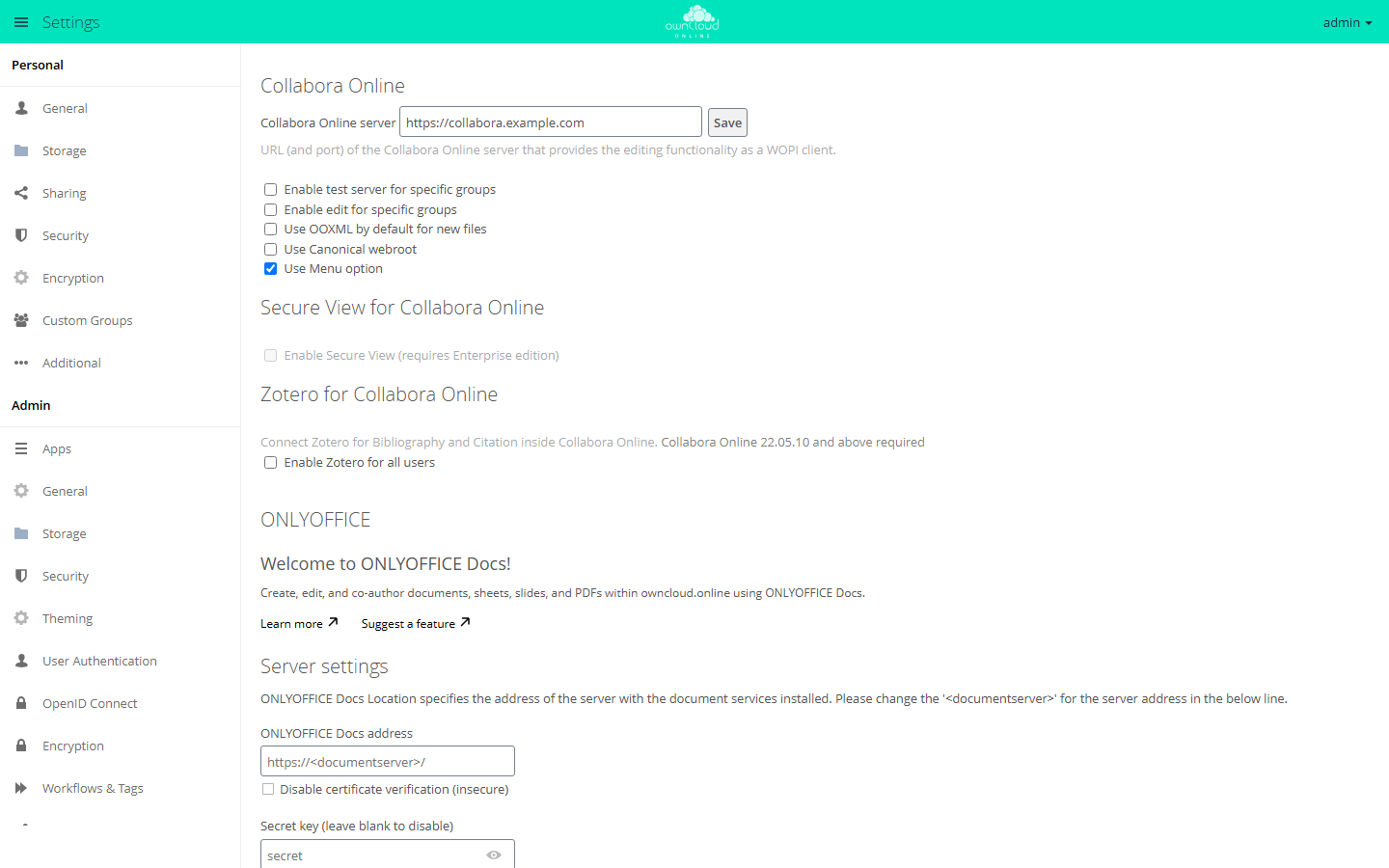
- In "Collabora Online server", enter the address with scheme and port, for example
https://collabora.example.com:9980. - Click "Save".
Without http:// or https://, the app rejects the address with "Invalid WOPI Url. Only
http or https scheme is allowed." If the address uses a different scheme than
owncloud.online, the app saves it with the message "Saved with error: Collabora Online
should use the same protocol as the server installation."
More options
| Option | Key | Effect |
|---|---|---|
| "Enable test server for specific groups" | test_wopi_url, test_server_groups |
Members of the selected groups work with a second Collabora server |
| "Enable edit for specific groups" | edit_groups |
Only these groups can edit. Everyone else opens documents read-only |
| "Use OOXML by default for new files" | doc_format |
New files are created as .docx, .xlsx, and .pptx instead of .odt, .ods, and .odp |
| "Use Canonical webroot" | canonical_webroot |
Fixed webroot for Collabora when the instance is reachable through several webroots |
| "Use Menu option" | menu_option |
"Office" entry in the app menu (default: on) |
| "Enable Zotero for all users" | zotero |
Zotero reference manager in the editor, requires Collabora Online 22.05.10 or later |
| command line only | open_in_new_tab |
true (default) opens documents in a new browser tab |
You can also set and read every value with occ:
sudo -u www-data php8.4 occ config:app:set richdocuments wopi_url \
    --value https://collabora.example.com:9980
sudo -u www-data php8.4 occ config:app:get richdocuments wopi_url

# open documents in the same tab
sudo -u www-data php8.4 occ config:app:set richdocuments open_in_new_tab --value false
Separate groups in edit_groups and test_server_groups with |.
To show the app to one group only, set the system value collabora_group in
config/config.php:
sudo -u www-data php8.4 occ config:system:set collabora_group --value office
If the group does not exist, nobody can use the app, and the server log records the
error with the collabora tag.
Secure View
Secure View is not available in this app for owncloud.online. The checkbox in the "Secure View for Collabora Online" section stays grayed out. For shares that recipients may only view with a watermark and cannot download, use the Office (Collabora Online) app with SecureView.
Usage
- Clicking an office document in the file list opens it in the editor. In the file's menu, the action is called "Open in Collabora".
- To create a file, use the plus icon ("New"): "Document", "Spreadsheet", "Presentation", and, as long as ODF is the default format, "Drawing".
- The "Office" entry in the app menu lists the account's office files.
- On a public link page, "View/Edit in Collabora" opens the file in the editor.
- Zotero: once Zotero is enabled, each person enters their own key under Settings → Personal → Additional in the "Zotero for Collabora Online" section (field "Zotero Personal API Key:"). Create the key in Zotero under "Home > Settings > Feeds/API > Create new private key".
Limits and notes
- Enable only one office app. While this app is enabled, SecureView in the Office (Collabora Online) app has no effect.
- With encryption enabled, the app works only with master key encryption. With per-user keys, the section shows a red notice.
- An access token is valid for 10 hours. The
CleanupExpiredWopiTokensbackground job deletes expired tokens from therichdocuments_wopitable. Without cron, the table keeps growing. - The discovery of the Collabora server is cached for one hour. A changed server address may only take effect after that time.
Troubleshooting
The app writes its messages to the server log with the richdocuments tag.
| Symptom | Cause | Fix |
|---|---|---|
| "Collabora Online: no server configured." | wopi_url is empty |
Enter the address and save |
| Log: "Cannot resolve the host" | The server cannot resolve the name of the Collabora server | Check DNS |
| Log: "Cannot connect to the host" | Port blocked or service stopped | Check the firewall and the service |
| Log: "SSL certificate is not installed" | owncloud.online does not trust the certificate of the Collabora server | Add the CA certificate with occ security:certificates:import <file> |
| Log: discovery "is not a well-formed XML string" | Something other than Collabora answers at /hosting/discovery, for example an error page of the reverse proxy |
Check the forwarding, open the address directly in a browser |
| The editor loads but stays empty or shows an error | Collabora cannot reach owncloud.online | Check that Collabora can reach …/wopi/files/…; with several webroots, set canonical_webroot |
| No "Office" entry in the app menu | menu_option is false, or the account is not in collabora_group |
Check the value or the group membership |
The richdocuments_wopi table keeps growing |
Background jobs do not run | Set up cron |