

Server log and error messages
When the interface reports "Internal Server Error", the actual cause is in the server log. The request ID on the error screen leads you to the matching entry, even on an instance with heavy traffic.
Where to find the log
By default in the data directory:
<datadirectory>/owncloud.log
The data directory is set in config/config.php under datadirectory
(/var/oco-data in the installation guide).
logfile sets a different location:
'logfile' => '/var/log/owncloud.online/owncloud.log',
The directory must be writable by the web server user. If the file cannot be
created there, the server keeps writing to <datadirectory>/owncloud.log.
Every line is a JSON object with these fields:
| Field | Meaning |
|---|---|
reqId |
Request ID, the same one the error screen shows |
level |
0 = debug, 1 = info, 2 = warning, 3 = error, 4 = fatal |
time |
Timestamp |
remoteAddr |
Client address (behind a proxy, see Reverse proxy and TLS) |
user |
Affected account (or --) |
app |
App or component that wrote the entry |
method / url |
Endpoint called |
message |
Error message, for exceptions with class and stack trace |
Finding the entry for an error message
The error screen shows a request ID under "Technical details" (for example
ZXXTJzcZ10tDSMNjmlAf). Use it to find the exact request in the log:
grep 'ZXXTJzcZ10tDSMNjmlAf' /var/oco-data/owncloud.log
Formatted for reading (with jq):
grep 'ZXXTJzcZ10tDSMNjmlAf' /var/oco-data/owncloud.log | jq '{time, level, app, method, url, message}'
Only the latest errors, regardless of a request ID:
tail -n 200 /var/oco-data/owncloud.log | jq 'select(.level >= 3) | {time, app, message}'
The log in the web interface
Since 11.0.24, Settings → Admin → General shows the latest entries in the "Log" section, newest first. At the top, you choose the log level ("What to log") and download the file with "Download logfile (…)". Under "Log entries", you filter by "Level" and "App" and search the entries with "Search". The search also covers request IDs, user names, addresses, exception classes, and stack traces, so the request ID from the error screen leads straight to the entry. Clicking a message opens the details with exception, trace, request ID, and remote address.
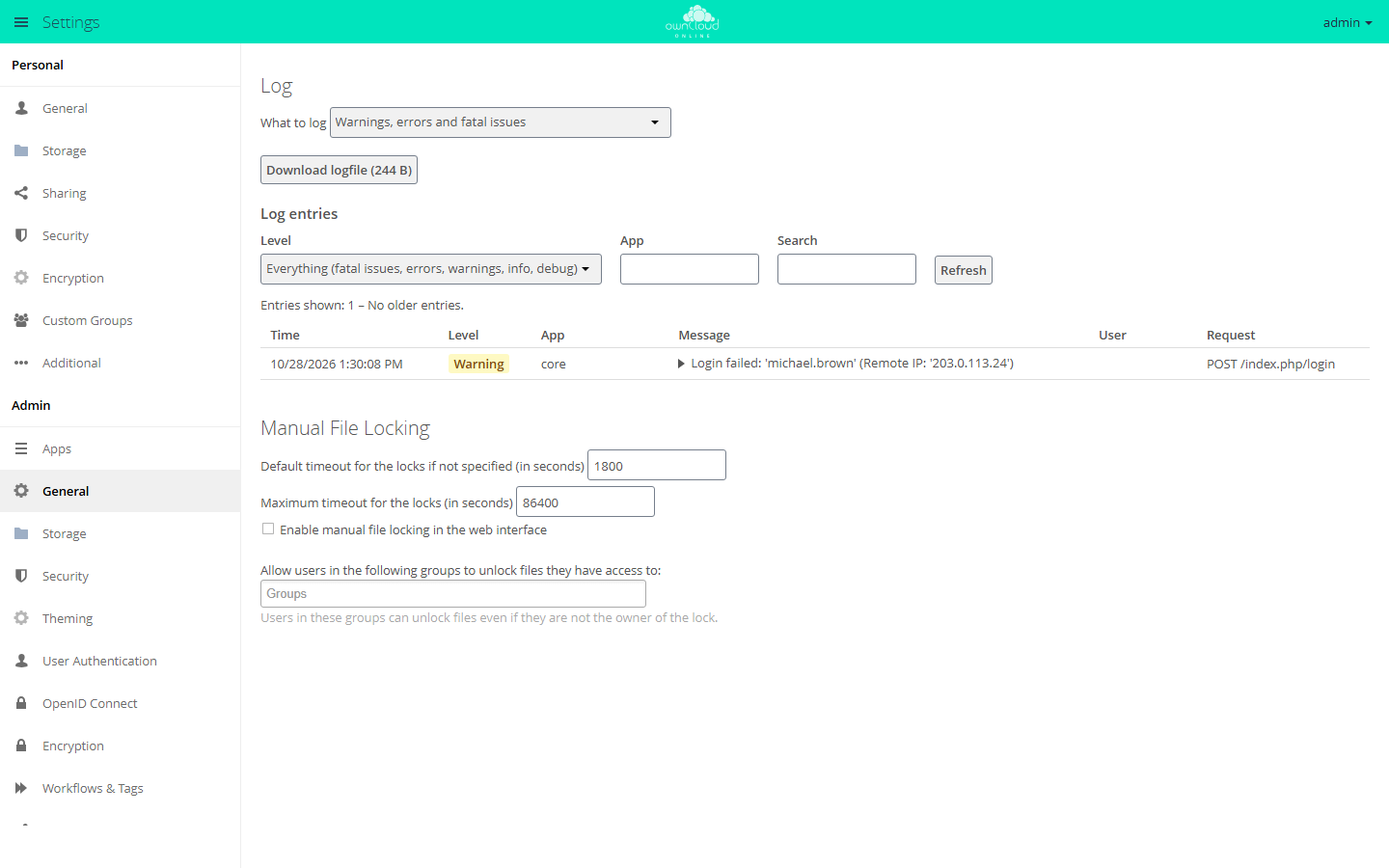
Only administrators can use this view. It appears only if log_type is set to
owncloud (log written to a file) and the file already exists. With syslog
or errorlog, the "Log" section is missing.
For scripts and monitoring, GET /index.php/settings/admin/log/entries
returns the same data as JSON, with the parameters offset, count (1 to
200), level, app, and search. Authenticate with the browser session or
with HTTP basic auth using an administrator's password or app password. With a
memory cache configured, each administrator can make 60 requests per minute;
after that, the server answers with HTTP 429 and Retry-After.
Configuring logging
# Detail level: 0 = debug ... 4 = fatal (default: 2)
sudo -u www-data php8.4 occ log:manage --level 1

# show the current settings
sudo -u www-data php8.4 occ log:manage

# Rotation: the default is 104857600 bytes (100 MB), here 500 MB
sudo -u www-data php8.4 occ config:system:set log_rotate_size --value 524288000 --type integer

# Turn rotation off if the system's logrotate handles the file
sudo -u www-data php8.4 occ config:system:set log_rotate_size --value 0 --type integer
--level also accepts the names debug, info, warning, error, and
fatal.
Rotation happens during a background job run: owncloud.log becomes
owncloud.log.1, and an older owncloud.log.1 is overwritten. Together, the
logs therefore take up at most twice the configured size. Rotation at 100 MB
has been on by default since 11.0.20. Before that, the file grew without limit
as long as log_rotate_size was not set.
Turn on --level 0 (debug) only temporarily for troubleshooting: it produces a
lot of entries and can contain details that should not be stored permanently.
Set it back to 2 afterwards.
What belongs in an error report
So that a problem can be handled without follow-up questions:
- The request ID from the error screen.
- The log lines for this ID (see above), with the complete stack trace.
- Versions:
occ status(server) and the client version, if a client is involved. - What exactly was done, step by step, and whether it can be reproduced.
- When it last worked, especially before or after an update.
Before sending, redact credentials, tokens, and personal paths. Since
11.0.25, access_token, requesttoken, and password appear in the logged
address only as ***. Tokens in the path of an address (for example in
password reset links) and in message text are still there, as is everything
in logs from before the update.
Common causes
Internal server error right after an update
Almost always, the database migrations have not run yet. The code then expects
columns that do not exist in the database yet. Typical signs: the login or
individual areas fail with error 500, and the log shows an
InvalidFieldNameException or "no column named …".
sudo -u www-data php8.4 occ upgrade
If occ upgrade reports that the system is up to date even though migrations
are missing, you can run them one by one:
sudo -u www-data php8.4 occ migrations:status core
sudo -u www-data php8.4 occ migrations:execute core <version>
occ upgrade is a fixed part of every update, see
Backups and updates.
Maintenance mode stays on
sudo -u www-data php8.4 occ maintenance:mode --off
Other symptoms
Login loops, JavaScript errors, missing plugin dependencies, and client login problems are covered in Troubleshooting.