

Schwarzes Brett
API key required
The Marketplace lists this app only for instances with a valid API key. You get the key from BW-Tech GmbH on request. To enter it, open Market → Settings → Add API Key from the app menu, paste the key into the "Your personal API Key" field, and click "Save". The app then appears in the catalog. For details, see Market: Enter an API key. App ID: schwarzes_brett. This page describes version 1.1.0.
Schwarzes Brett (German for "notice board") is a shared bulletin board for schools and teams. Logged-in users post notes for everyone: announcements, events, offers, or useful links, each with categories, a display period, a location, and an image. Optionally, moderators review every note before it appears. The app keeps its German name in the English interface as well.
Requirements
| Component | Requirement |
|---|---|
| owncloud.online | 11.x |
| PHP | 8.4 with the fileinfo extension |
| Database | MariaDB or MySQL, PostgreSQL, or SQLite |
| Notifications (optional) | the notifications app, so that moderators and authors receive notices |
Installation
- Enter the API key, see the box above.
- In the app menu, open Market, go to the app, and install it, or use the command line:
sudo -u www-data php8.4 occ market:install schwarzes_brett
When it is enabled, the app creates two tables: oc_sb_notes for the notes and
oc_sb_activity for the rate limits (each with the instance's table prefix). "Schwarzes
Brett" then appears in the app menu.
Configuration
The settings are under Settings → Admin → Additional in the "Schwarzes Brett" section. By default, every logged-in user can create notes, and notes appear immediately.
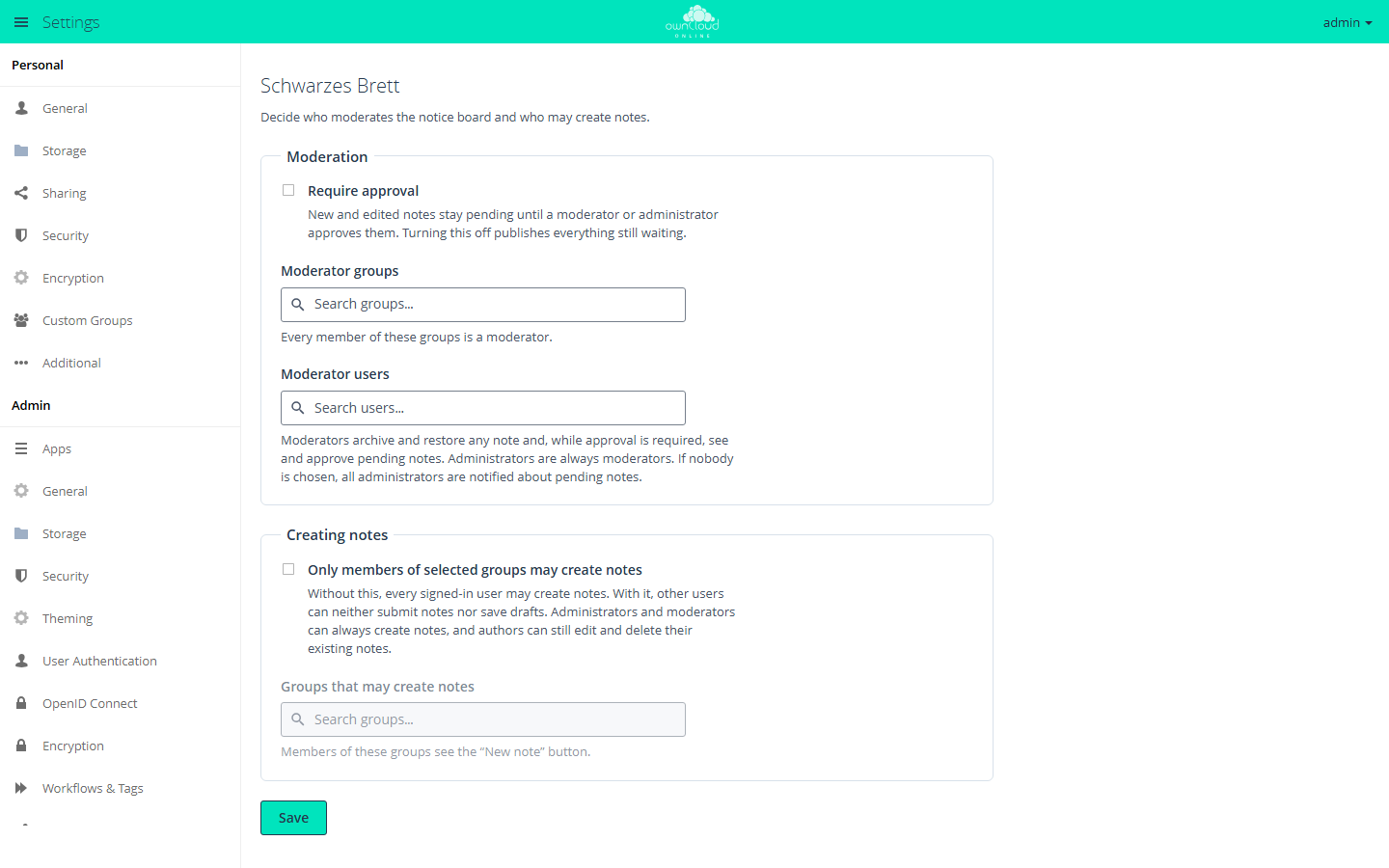
Moderation
| Setting | Effect |
|---|---|
| "Require approval" | New and edited notes, including a new image, stay pending until a moderator or administrator approves them. Turning this off publishes everything still waiting |
| "Moderator groups" | Every member of these groups is a moderator |
| "Moderator users" | Individual accounts are moderators |
Administrators are always moderators. Moderators archive and restore any note. While approval is required, they see and approve pending notes. If nobody is chosen, all administrators are notified about pending notes. The search fields show at most 20 results, and a list holds up to 250 entries. For more people, use a group.
Creating notes
| Setting | Effect |
|---|---|
| "Only members of selected groups may create notes" | Other users can neither submit notes nor save drafts. Administrators and moderators can always create notes. Authors can still edit and delete their existing notes |
| "Groups that may create notes" | Members of these groups see the "New note" button |
Click "Save" to apply the settings.
Command line
You can read the settings with occ. Change them in the web interface, because only
there does turning off approval publish the waiting notes.
sudo -u www-data php8.4 occ config:app:get schwarzes_brett approval_enabled
| Key | Content |
|---|---|
approval_enabled |
1 if approval is required |
moderator_group_ids, moderator_user_ids |
Moderator groups and moderator users as a JSON list |
restrict_create |
1 if only selected groups may create notes |
creator_group_ids |
Groups that may create notes, as a JSON list |
image_quota_mb |
Storage for note images per account in MB, default 100, 0 means no limit |
Note images do not count toward the account's quota. For that reason, the images of one account may use at most 100 MB in total by default. Moderators and administrators are exempt. To change the limit:
sudo -u www-data php8.4 occ config:app:set schwarzes_brett image_quota_mb --value 200
Usage
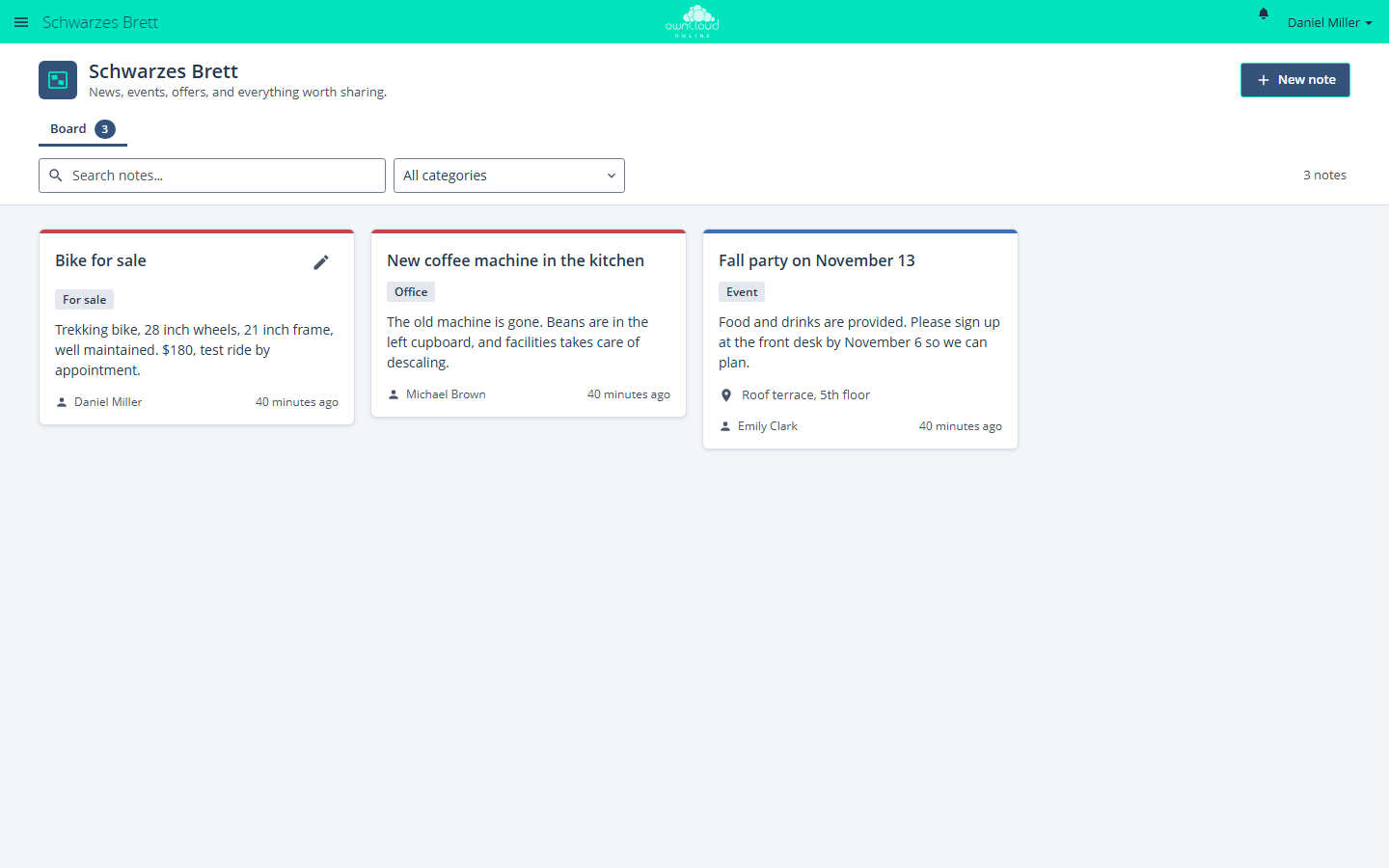
- Create a note: "New note" opens the editor. Only the "Title" is required. In addition, there are "Description", "Categories" (separated by commas), under "When and where" the fields "Starts", "Ends", "All-day event", and "Location", a "Link" with "Web address" and "Link label", and an "Image". Then click "Publish" or "Save as draft".
- Tabs: "Board" shows the published notes. "Drafts & pending" and "Archive" only appear when they contain something.
- Display period: before its start, a note waits under "Drafts & pending"; after its end, it moves to the archive. Both dates are optional.
- Archive: "Archive note" takes a note off the board at once. "Restore note" brings it back and removes an end date that has passed. Archiving deletes nothing.
- Search: "Search notes…" and the "All categories" filter narrow down the view.
- Approve: moderators see a notice about waiting notes, open them with "Review now", and release them with "Approve". There is no reject function. Moderators archive unsuitable submissions, which then stay invisible to everyone else.
| Action | Who may do it |
|---|---|
| Read published notes | every logged-in person |
| Create a note | every logged-in person, unless restricted to groups |
| See a draft | the author and administrators |
| See a scheduled note (start in the future) | the author, moderators, and administrators |
| Change or delete a published note | the author and administrators |
| Archive and restore | the author, moderators, and administrators |
Limits and notes
- Notes, images, and the authors' display names are visible to every logged-in user of the instance. There is no restriction by groups or classes, so personal data does not belong on the board.
- Accounts without moderation rights create at most 20 notes per hour and 50 per 24 hours; deleted notes count as well. Once 10 notes of an account are waiting for approval, the server refuses every further submission.
- Images: JPEG, PNG, GIF, or WebP up to 5 MB. If PHP allows less through
upload_max_filesizeorpost_max_size, the smaller limit applies. The app detects the type from the content and rejects SVG. It removes metadata such as EXIF including the GPS position during upload. - The images are stored in the data directory under
appdata_<instanceid>/schwarzes_brett/note-images/, outside all user folders. So they are reachable neither over WebDAV nor through shares. This also works with object storage as primary storage. - On MariaDB and MySQL without
utf8mb4, the app rejects texts containing emoji. - If an account is deleted, its drafts and their images are removed. Submitted, published, and archived notes stay and show "Deleted account" as the author. After that, only administrators can change or delete them.
- Archived notes stay stored until someone deletes them.
- To prevent notification floods, moderators get at most one notification per note every 15 minutes until they decide, and at most 10 per author account per hour.
- Guest accounts of the Guests app can use the board only if
schwarzes_brettis on the app whitelist for guests.