

Market
With the Market app, admins install, update, and remove apps in the web
interface. The apps come from the Marketplace at
https://marketplace.owncloud.online. For servers without internet access, you
can set up a catalog in the file system instead. The app also provides the
occ commands market:*.
Availability
Included in the core. The server archive ships the app and enables it during
installation. App ID market, version 0.10.10 in owncloud.online 11.0.25.
The Marketplace also lists it as a public app.
Requirements
| Area | Requirement |
|---|---|
| owncloud.online | 11.x |
| PHP | 8.4 or later |
| Network | outgoing HTTPS connections from the server to marketplace.owncloud.online. Without internet access, see Without internet access. |
| App directory | writable by the web server user, operation.mode set to single-instance |
| Cron | for the daily update check |
Installation
Nothing to do: the app is part of the server. If it was disabled:
sudo -u www-data php8.4 occ app:enable market
While the app is disabled, the Market entry in the app menu and all
occ market:* commands are missing.
Install and update apps
Admins open the Market from the app menu in the top left corner. Other accounts do not see the entry.
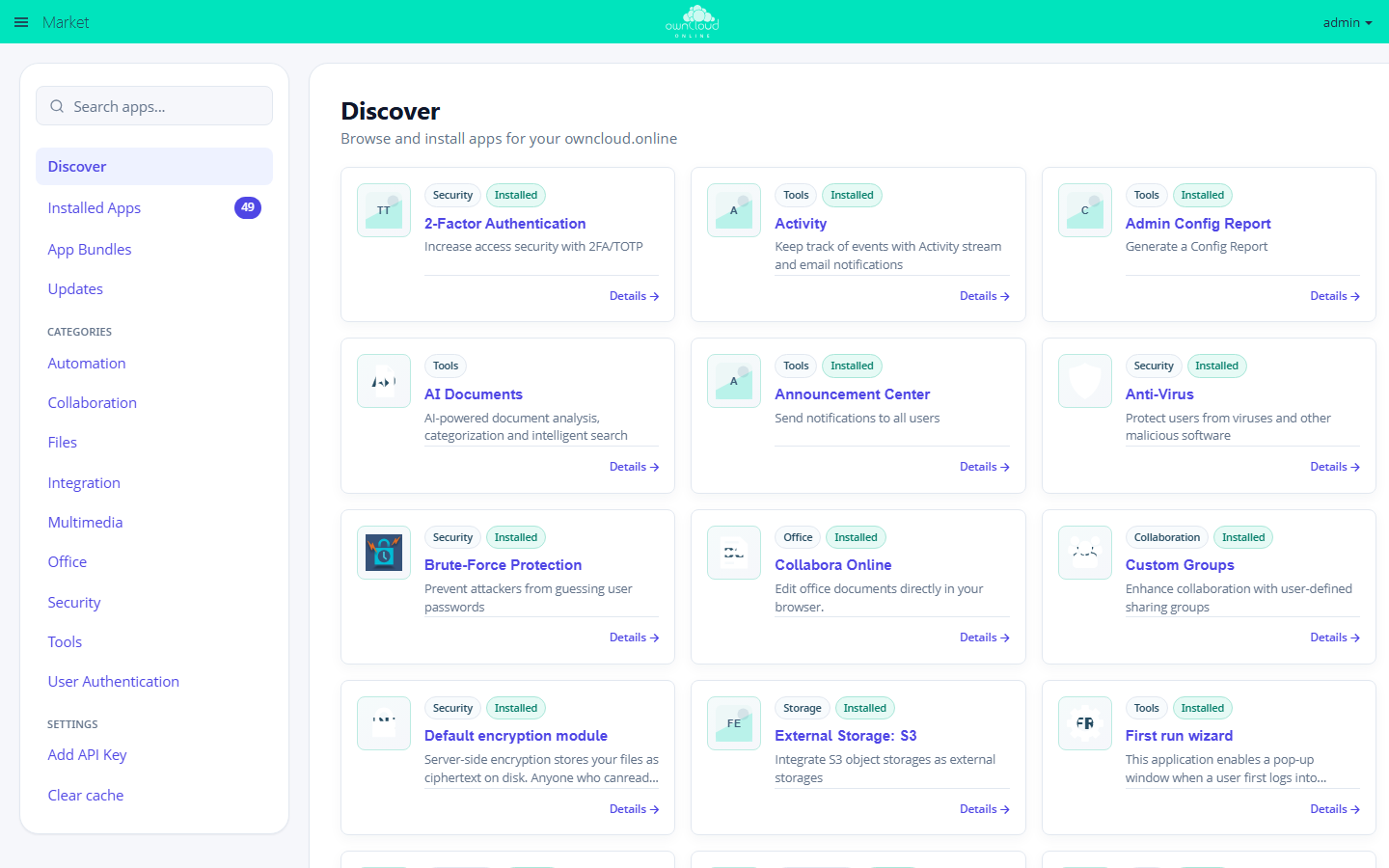
The Discover view: search, categories, and settings on the left, the apps from the Marketplace on the right.
| Sidebar entry | Content |
|---|---|
| Search apps... | filters the list shown |
| Discover | all apps in the catalog |
| Installed Apps | all apps on this instance with version, state, and compatibility |
| App Bundles | packages of several apps |
| Updates | apps with a newer version in the catalog |
| Categories | the catalog by category |
| Settings | Add API Key and Clear cache |
To install an app:
- Find the app under Discover or through the search, and open Details.
- Click Install.
The Market downloads the package, extracts it into the writable app directory, and enables the app. If the catalog provides a SHA-256 checksum (the Marketplace does), the Market checks the package against it first. If enabling fails, it deletes the extracted directory again.
New versions are listed under Updates. Update installs them.
The same steps on the command line:
| Command | Effect |
|---|---|
occ market:list |
app IDs of all apps in the catalog |
occ market:install <app-id> |
installs and enables the app. If it is already installed, the command installs an update within the same major version. |
occ market:install --local <package.tar.gz> |
installs a package from the file system but does not enable the app. Run occ app:enable <app-id> afterwards. |
occ market:upgrade --list |
lists available updates |
occ market:upgrade <app-id> or --all |
updates one or all apps |
occ market:upgrade --major <app-id> |
allows a change of the major version |
occ market:uninstall <app-id> |
disables the app and deletes its directory |
All commands run as the web server user, for example
sudo -u www-data php8.4 occ market:list. What happens to the data of a removed
app is described in Apps and Marketplace.
Enter an API key
The Marketplace shows some apps only with an API key. Their pages in this
documentation start with the box "API key required". Without a key, these apps
are missing from the catalog, and occ market:install reports "Unknown app
(…)".
- Request the key from BW-Tech GmbH.
- In the Market sidebar, click Add API Key under Settings.
- Paste the key into the Your personal API Key field and click Save.
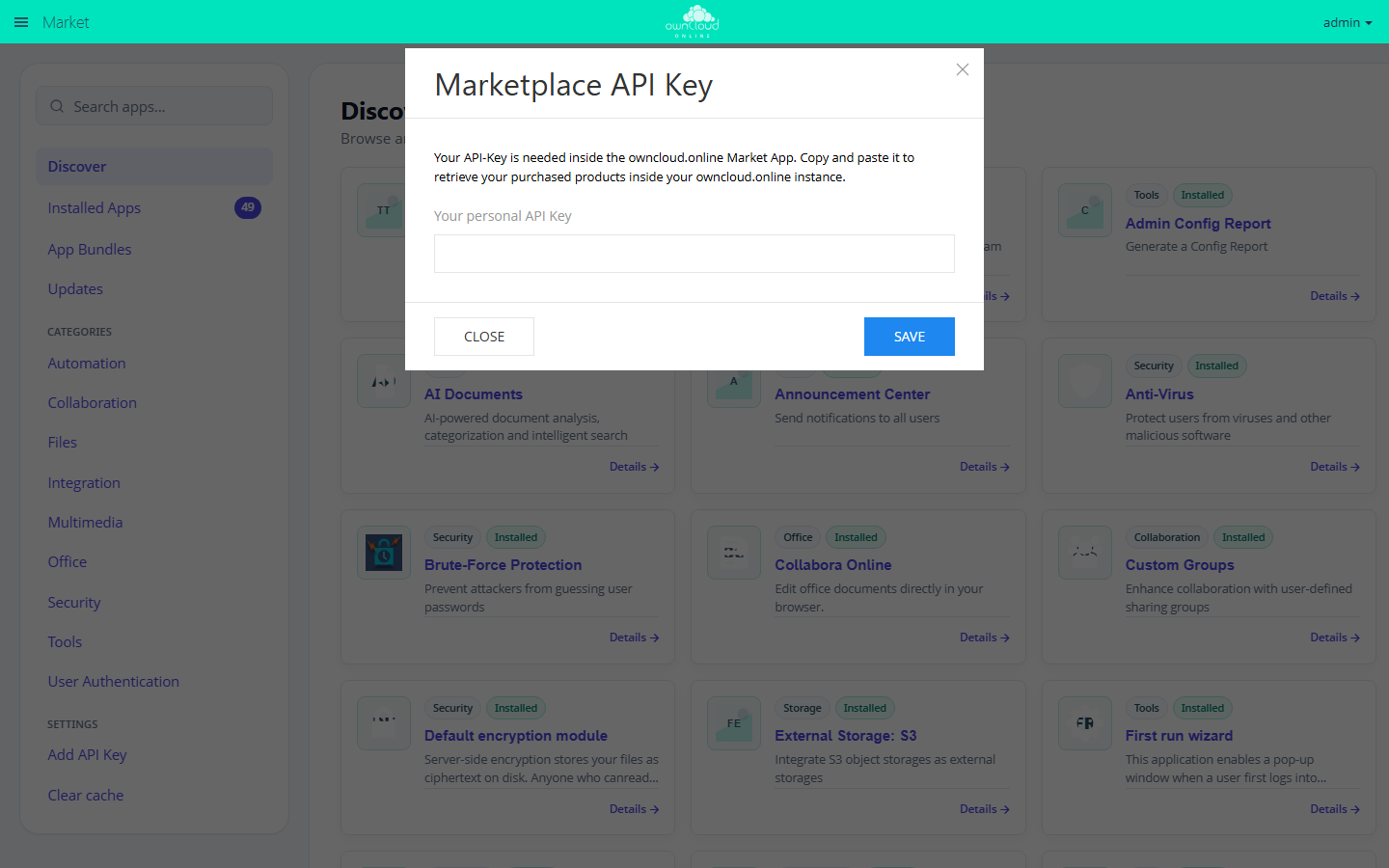
"Add API Key" opens this dialog. You get the key from BW-Tech GmbH.
The Market checks the key with the Marketplace and then reloads the catalog. Once the key is accepted, the sidebar entry reads Edit API Key, and the additional apps appear under Discover. If the entry still reads Add API Key, the Marketplace rejected the key and the Market did not save it.
On the command line:
sudo -u www-data php8.4 occ config:app:set market key --value '<API-KEY>'
Then select Clear cache in the Market. Otherwise, the web interface and
occ market:install keep using the cached catalog without the additional apps
for up to 30 minutes.
If the key is set as 'marketplace.key' => '<API-KEY>', in
config/config.php, that entry takes precedence. The Market then hides
Add API Key, and the key can only be changed in config.php.
Settings in config.php
| Key | Default | Effect |
|---|---|---|
appstoreurl |
https://marketplace.owncloud.online |
Address of the Marketplace. file:///path switches to your own catalog in the file system, local to the sample catalog inside the app. |
marketplace.key |
not set | API key. Takes precedence over the key entered in the web interface. |
marketplace.ca |
not set | Path to a CA file the Market uses to verify the TLS certificate of the Marketplace, for example behind a proxy with its own CA |
has_internet_connection |
true |
false blocks the catalog and downloads from the Marketplace. A catalog in the file system keeps working. The Market only accepts the boolean true, so always add --type boolean when you use occ config:system:set. |
If the server reaches the internet through a proxy, the Market uses the
proxy and proxyuserpwd entries from the same file.
Update notifications
A background job checks once a day for newer versions of the installed apps.
It only reports versions that match the running server version. Each member of
the admin group then gets a notification: "Update for … to version … is
available." For this, background jobs must run (see
Background jobs) and the
Notifications app must be enabled.
To notify other or additional groups, set a JSON list:
sudo -u www-data php8.4 occ config:app:set market notify_groups --value '["admin","it-ops"]'
Without internet access
Install single packages directly from the file system, then enable the app:
sudo -u www-data php8.4 occ market:install --local /srv/packages/configreport-0.4.5.tar.gz
sudo -u www-data php8.4 occ app:enable configreport
For your own catalog, create a directory with the files apps.json,
categories.json, and bundles.json, copy the packages into it, and point
appstoreurl to the directory:
sudo -u www-data php8.4 occ config:system:set appstoreurl --value 'file:///srv/app-catalog'
An entry in apps.json:
[
  {
    "id": "configreport",
    "name": "Admin Config Report",
    "categories": ["tools"],
    "downloadable": true,
    "releases": [
      {
        "version": "0.4.5",
        "platformMin": "11",
        "platformMax": "11.99",
        "license": "AGPL-3.0",
        "download": "configreport-0.4.5.tar.gz",
        "checksum": "sha256:<checksum>"
      }
    ]
  }
]
- Every category in
categoriesmust exist incategories.json, for example[{"id": "tools", "translations": {"en": {"name": "Tools"}, "de": {"name": "Werkzeuge"}}}]. bundles.jsoncontains[]if you do not need bundles.downloadis a path relative to the catalog directory or an HTTPS address. The Market rejects paths outside the catalog directory ("Local app archive … is not inside the catalog directory.").- With
checksum, the Market verifies each package after the download. Get the value withsha256sum <package>and copy only the 64 characters before the file name. - The directory and the packages must be readable by the web server user.
- The Market reads the three files again on every request.
The file marketplace/README.md in the app directory describes the full
format. With appstoreurl set to local, the Market shows the catalog from
that directory. It contains a single sample entry and serves as a template.
Limits and notes
- Only admins see the Market.
- The app cannot remove itself ("Market app can not uninstall itself."). Shipped apps can only be disabled.
- The catalog stays cached for up to 30 minutes. Clear cache reloads it right away.
- The Market never installs older versions. It only offers versions that are newer than the installed one and match the server version.
- If the app directory is not writable or
operation.modeis set toclustered-instance, the Market installs nothing. Installing a package by hand is described in Apps and Marketplace. occ market:uninstallnever deletes an app directory that contains.git.
Troubleshooting
| Message | Cause | Solution |
|---|---|---|
| "Unknown app (…)" | The app ID is not in the catalog: a typo, an app that requires an API key, or a catalog still in the cache | Check occ market:list, enter the API key, Clear cache |
| "Invalid marketplace API key provided" | The Marketplace rejects the stored key | Check the key or request a new one from BW-Tech GmbH |
| "No marketplace connection: …" | The server cannot reach the Marketplace: DNS, firewall, proxy, or TLS verification | Test the connection from the server, see below. With your own CA, set marketplace.ca. |
| "The Internet connection is disabled." | has_internet_connection is set to false or was set without --type boolean |
Run occ config:system:set has_internet_connection --value true --type boolean or use your own catalog |
| "Downloaded package for … failed the sha256 checksum verification." | The downloaded package does not match the checksum in the catalog | Try again. If the error persists, report it to BW-Tech GmbH. |
| "No compatible version for …" | No version of the app matches the running server version | Check the server version with occ status |
Test the connection from the server:
curl -sS -o /dev/null -w '%{http_code}\n' https://marketplace.owncloud.online/api/v1/categories.json
If the command prints 200, name resolution, firewall, and certificate are
fine. Behind a proxy, add -x http://<proxy>:<port>.