

Troubleshooting
For "Internal Server Error" or any unclear symptom, read the log first: Server log and error messages explains where it is, how to find the matching entry through the request ID from the error screen, and what belongs in an error report.
Login keeps returning to the login page
Check:
sudo -u www-data php8.4 occ config:system:get trusted_domains
sudo -u www-data php8.4 occ config:system:get overwrite.cli.url
Common causes:
- wrong domain in
trusted_domains - HTTP and HTTPS mixed behind a reverse proxy
- the browser does not accept the session cookie
overwriteprotocolis missing in a proxy setup- the PHP session path is not writable
Proxy example:
'overwrite.cli.url' => 'https://cloud.example.com',
'overwriteprotocol' => 'https',
'trusted_proxies' => ['127.0.0.1'],
Details are in Reverse proxy and TLS.
WebDAV returns 503 under load
If the server answers many simultaneous requests, for example after a large
sync or bulk upload, with HTTP 503 and the message "Internal Server Error",
the request failed at a service while starting up, before WebDAV could handle
it. The actual exception is in the log (app remote). Common causes:
-
Redis disrupted or overloaded (
RedisException, for example "read error on connection"): as a cache (memcache.local,memcache.distributed), a Redis outage does not abort any request. It acts like an empty cache and appears once per request in the log ("Memory cache unavailable …"). For file locking (memcache.locking), Redis remains mandatory. Set a connection timeout, otherwise every request waits for the operating system's TCP timeout when Redis is unreachable:php'redis' => [ 'host' => 'redis.example.com', 'port' => 6379, 'timeout' => 1.5, ],On the Redis server,
maxclientsandtcp-backlogmust be higher than the total number of PHP workers on all web servers that use it. -
Database connections exhausted (
Failed to connect to the database, "Too many connections"; the response is then often599, and the exception is incrash-YYYY-MM-DD.login the data directory):max_connectionson each database node must be higher than the number of PHP workers that reach it, and with several web servers or tenants on one cluster, higher than their total. -
Galera cluster with load balancing across all nodes ("Deadlock found when trying to get lock" with concurrent changes): direct writes to one node, for example by listing the other nodes as
backupin HAProxy. -
Connections dropped during long requests ("MySQL server has gone away"): the idle timeouts of a database proxy (HAProxy
timeout clientandtimeout server) must be longer than the longest request, such as the assembly of large uploads. -
Session lock (sessions in Redis with
redis.session.locking_enabled): requests of the same session wait for each other, at mostredis.session.lock_retries×redis.session.lock_wait_time(default 100 × 20 ms = 2 s). Sync clients release the lock right after reading the session. If it still is not released in time, the request continues, and the log reports "Session lock not acquired in time" (appcore). A logged-in browser then keeps its session read-only ("continuing read-only"; changes to it are not saved). This works with phpredis 5.3 and 6.3 or later throughredis.session.lock_failure_readonly, which owncloud.online turns on itself unless aphp_admin_valuesets it to 0. Clients with an Authorization header (sync clients, API), empty sessions, and sessions that cannot be read at all without the lock (phpredis 6.0 to 6.2) get a new session with a new cookie ("continuing with a new session"); a browser is then logged out. If these messages pile up across many sessions, a request holds its session too long, usually because of a slow database or an overloaded Redis. -
Orphaned session lock: if a PHP process ends without releasing the lock (restart of Apache or PHP-FPM, OOM killer), the lock stays until
redis.session.lock_expire; without a value of its own,max_execution_timeapplies, usually 3600 s for owncloud.online. Sync clients then switch to a new session on their own. A logged-in browser waits the full time on every request until it logs out and back in. Every lock is a key of its own,<prefix><session ID>_LOCK(database and prefix fromsession.save_path; the session ID is in the cookie named like theinstanceid). Its value names the host and PID of the PHP process that holds the lock. If that process is no longer running, delete the lock:bashredis-cli -h <redis-host> -n <db-number> --scan --pattern '<prefix>*_LOCK' redis-cli -h <redis-host> -n <db-number> GET '<prefix><session ID>_LOCK' redis-cli -h <redis-host> -n <db-number> DEL '<prefix><session ID>_LOCK'
Client logged out after revocation
Sync clients send their session cookie with every request. The session is valid only as long as the login it started with is valid. The server checks this before every request:
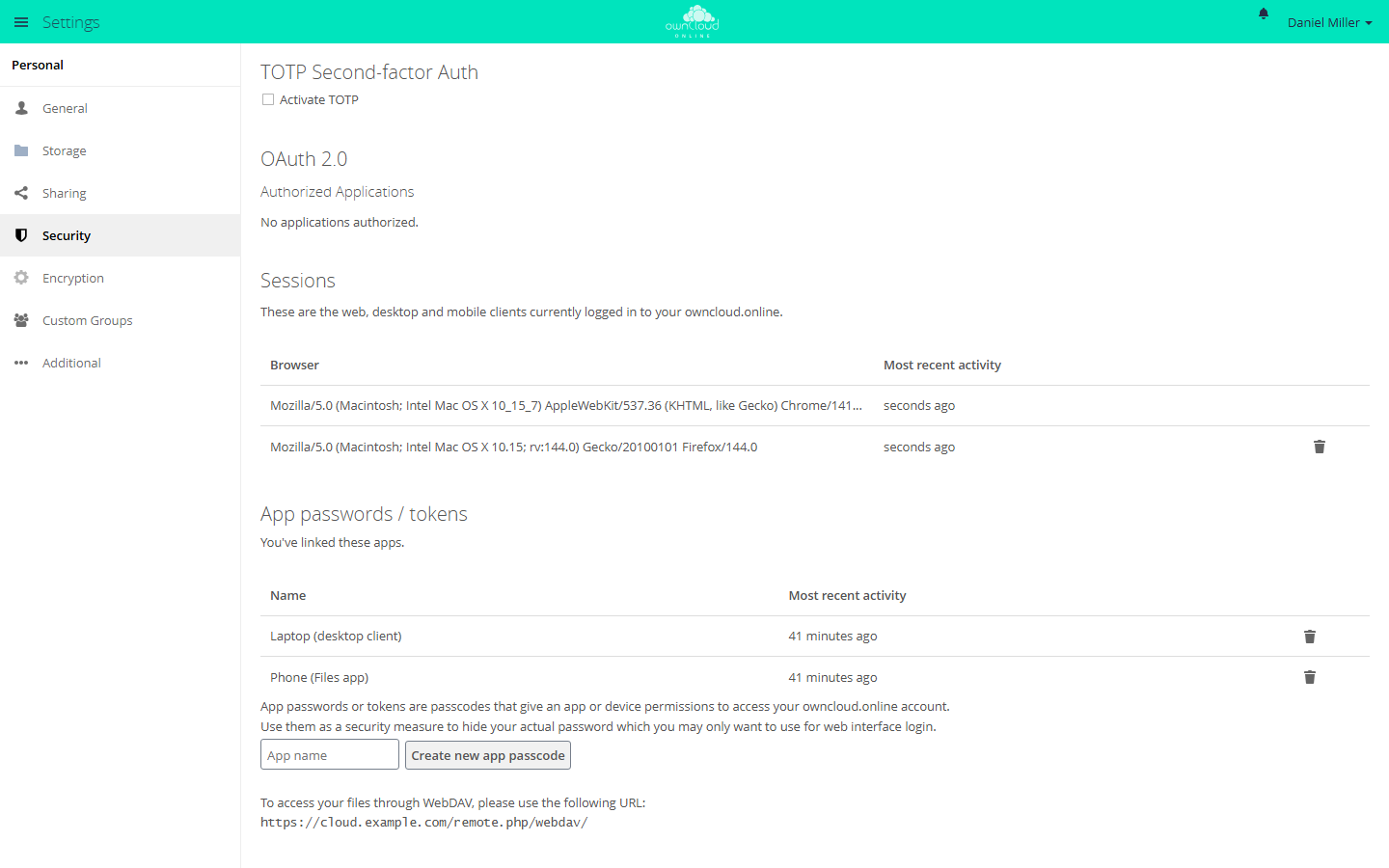
- App password revoked (Personal → Security → "App passwords / tokens"): the device's next request gets 401, even if it only sends the cookie. The client has to be set up again with a new app password.
- Password changed: a client that logs in with the password loses its
session no later than
last_check_timeoutminutes (app valuecore, default 5) after the change. If it sends the old password, the server rejects the HTTP basic login; if it sends only the cookie, the server checks the password stored in the session. If no password is stored in the session, a password change does not end it. App passwords that store the old password become invalid at their next check (as already happened when logging in with them), their sessions end, and the client needs a new app password. App passwords without a stored password remain valid, for example those created in a session without a stored password, as do the app passwords of LDAP accounts, which the server does not check against the password. They have to be revoked. Each of these checks with the old password appears as "Login failed" in the log and counts as a failed attempt for brute-force protection. A password change alone therefore does not reliably lock out anyone who holds a session (see Lost device or stolen credentials). - Session removed under "Sessions": the session ends with the next request. If the device still has valid credentials (app password, OAuth2 token, password), it logs in again right away. To lock a device out, also revoke its access instead of only removing the session.
- Desktop client authorization (OAuth2) revoked (Personal → Security →
"OAuth 2.0" → "Authorized Applications"): WebDAV and OCS requests with the
token are rejected immediately. The session can no longer be used: it is
valid only together with a token that the OAuth2 app confirms for its
account, and it ends with the first request without a token (for example
with only the cookie), at the latest when it expires (
session_lifetime).
An expired access token does not end the session for WebDAV: the request with
it gets 401, the client renews the token and continues with the same session.
If the request comes in through OCS or the web interface first, the session
ends there as before, and the client logs in again with the new token. The
desktop client calls token renewal (POST /index.php/apps/oauth2/api/v1/token)
and OpenID Connect discovery (/index.php/apps/openidconnect/config, the
target of /.well-known/openid-configuration) with the cookie but without a
token. These calls leave the session untouched.
A session that ended this way is logged at level info: "Client session of
<account> ended: <reason>". Requests that send only the cookie without a
token for a session started through OAuth2 are no longer accepted; desktop and
mobile clients always send the token. Sessions that started before the update
to 11.0.25 and send only the cookie without an app password afterwards have to
log in once more.
Lost device or stolen credentials
A password change ends the sessions of clients that log in with the password
in the normal way, no later than after last_check_timeout minutes. Anyone
who holds a session, that is, has its cookie, is not reliably locked out by
that. What does work: removing the session under "Sessions" and revoking the
app password it started with (the session ends with its next request),
revoking the OAuth2 authorization (the session can no longer be used), and a
disabled account, for as long as it stays disabled. If you suspect misuse, do
all of it together:
- Change the password.
- Under Personal → Security → "Sessions", remove all other sessions. A session appears there only once it has a session token; some clients get it only with their second request. Check the list again later.
- Review the app passwords and revoke every one that does not clearly belong to one of your own, still trusted devices. Also revoke the desktop client authorizations (OAuth2). Set up the affected devices again.
- If you cannot do this right away, disable the account until then (on the
Users page or with
occ user:disable <account>): as long as it is disabled, none of its sessions can be used. Disabling removes neither sessions nor app passwords, though. A session that sends no request in the meantime can stay valid after the account is enabled again. Always complete steps 2 and 3.
None of these steps ends public links and shares created during that time. Check them separately.
JavaScript error: jQuery is not defined
The library under core/vendor/jquery/ is not loaded. The browser's
developer tools ("Network" tab) show which file returns 404 or 403.
-
Installation from the release package: the package contains
core/vendorin full. If the file is missing, the archive was not unpacked completely. Compare the checksum and unpack the program directory again, see Backups and updates. -
Installation from the Git repository:
core/vendoris checked in and contains security fixes to the libraries. If the directory is missing (for example aftermake clean), restore it from the repository (git checkout -- core/vendor). A rebuild withmakefetches the libraries without these fixes, see CVE status and security fixes. To install the PHP dependencies:bashcd /var/www/owncloud.online sudo -u www-data composer install --no-dev --optimize-autoloader -
Subpath or proxy: if all scripts return 404,
overwritewebrootis usually wrong, see Reverse proxy and TLS.
Plugin has no vendor folder
An app cannot be enabled or fails with a message about a missing class, and
its directory has no vendor/. The cause is almost always an app installed
straight from its Git repository instead of from a package. The packages from
the Marketplace include their libraries.
-
Install the libraries in the app directory, if the app has a
composer.json:bashcd /var/www/owncloud.online/apps-external/<app-id> sudo -u www-data composer install --no-dev --optimize-autoloader -
Or install the app as a package from the Marketplace. For an app that is already under
apps-external/,market:installonly installs a newer version. Move the existing directory out ofapps-external/first.bashsudo -u www-data php8.4 occ market:install <app-id>
Integrity warning after branding
Since 11.0.13, owncloud.online packages no longer show the message "Some files
have not passed the integrity check. …" when you change core files for
branding: the core does not enforce the check for the shipping channel
bwtech, even if the database still holds a different channel from an earlier
installation.
During occ upgrade, a repair step removes such an inherited channel.
On older versions, the message comes from this inherited channel. In that case:
sudo -u www-data php8.4 occ config:app:delete core OC_Channel
Then restart the check with "Rescan…" in the message. What the integrity check does and does not do is explained in Security and setup warnings. Write down your own changes to the core, because every update overwrites them.
OAuth login of the desktop client fails
Check:
- The OAuth2 app is enabled.
- The desktop client is registered as an OAuth2 client: under Settings →
Admin → User Authentication, the "OAuth 2.0" section lists the entry
"Desktop Client", and its redirection URI ("Redirection URI" column) is
http://localhost:*. - The server provides a valid OIDC discovery at
/.well-known/openid-configuration, or the client uses a compatible fallback.
The token request (POST /index.php/apps/oauth2/api/v1/token) uses HTTP basic
auth to identify the client, not the user. It therefore does not count as a
login attempt: no "Login failed" in the log, no brute-force protection, and a
session sent along stays in place. This also applies if the client sends its
credentials in the form body instead of through HTTP basic auth.