

Sharing policies
owncloud.online keeps its sharing rules under Settings → Admin → Sharing. The
switches there write app config values, so you can set almost every option
with occ config:app:set as well, for example during initial setup, in
scripts, or for reproducible configurations. The only exception on this page is
the list of trusted federation servers: it lives in its own database table,
not in the app config.
Run the occ commands on this page from the installation directory, for
example after cd /var/www/owncloud.online.
Where the settings are
Menu path: Settings → Admin → Sharing.
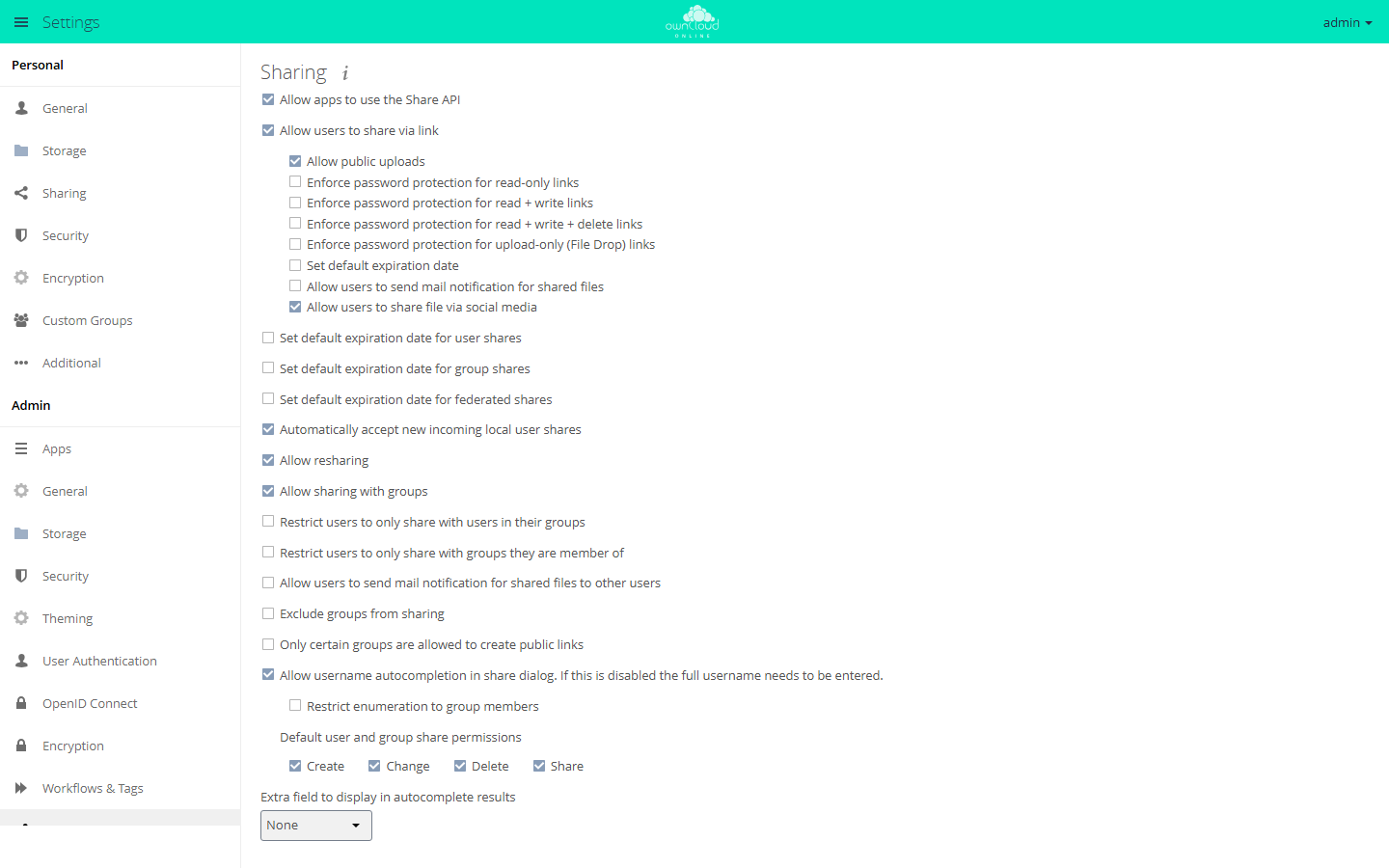
The page is built from several panels. Which ones appear depends on the enabled apps:
| Section | Source | Shown |
|---|---|---|
| Sharing | core (settings/templates/panels/admin/filesharing.php) |
always |
| Group Sharing Blacklist | files_sharing app |
always (the app is enabled by default) |
| Federated Cloud Sharing | federatedfilesharing app |
only if the app is enabled |
| Federation | federation app |
only if the app is enabled |
| Custom Groups | customgroups app, see Users and groups |
only if the app is enabled |
| Guests | guests app |
only if the app is enabled |
Almost all keys of the main section belong to the core app, not to
files_sharing. The keys for federated shares, for the recipient blacklist, and
for the groups allowed to create public links belong to files_sharing. Pay
attention to the app name when you set values with occ.
The yes/no switches in the main Sharing section store the strings yes and
no, not 1 and 0 (settings/js/admin.js). The panels of the guests and
federation apps work differently, see their sections below.
Turning sharing on or off
The top switch, Allow apps to use the Share API, is the main switch. If it
is set to no, the web interface hides all other sharing options, and the
server refuses access to public links
(apps/files_sharing/lib/Middleware/SharingCheckMiddleware.php).
| Key | App | Default |
|---|---|---|
shareapi_enabled |
core |
yes |
sudo -u www-data php8.4 occ config:app:set core shareapi_enabled --value no
The dependent values are kept but are no longer evaluated. When you set the
main switch back to yes, the previously stored configuration applies again
right away.
Public links
Allow users to share via link decides whether link shares can be created at
all. If the value is no, the server refuses to create them
(lib/private/Share20/Manager.php, linkCreateChecks) and blocks access to
existing links.
| Label | Key (app core) |
Default |
|---|---|---|
| Allow users to share via link | shareapi_allow_links |
yes |
| Allow public uploads | shareapi_allow_public_upload |
yes |
| Allow users to send mail notification for shared files | shareapi_allow_public_notification |
no |
| Language used for public mail notifications for shared files | shareapi_public_notification_lang |
owner |
| Allow users to share file via social media | shareapi_allow_social_share |
yes |
With shareapi_allow_public_upload set to no, only read-only links are
possible: the server rejects any link share that includes the create, change,
or delete permission. The language key takes either a language code or the
special value owner. In that case the language of the share owner is used
(label Owner language).
sudo -u www-data php8.4 occ config:app:set core shareapi_allow_links --value yes
sudo -u www-data php8.4 occ config:app:set core shareapi_allow_public_upload --value no
Enforcing passwords for links
Passwords are not enforced across the board but per link role. The server
compares the permissions of the share with fixed combinations
(lib/private/Share20/Manager.php, passwordMustBeEnforced):
| Label | Key (app core) |
Default | Applies to |
|---|---|---|---|
| Enforce password protection for read-only links | shareapi_enforce_links_password_read_only |
no |
read |
| Enforce password protection for read + write links | shareapi_enforce_links_password_read_write |
no |
folder: read + create |
| Enforce password protection for read + write + delete links | shareapi_enforce_links_password_read_write_delete |
no |
folder: read + change + create + delete, and file: read + change |
| Enforce password protection for upload-only (File Drop) links | shareapi_enforce_links_password_write_only |
no |
create only |
The check runs when a link share is created and when it is changed. To protect all public links, set all four keys. Each one only covers its own role:
sudo -u www-data php8.4 occ config:app:set core shareapi_enforce_links_password_read_only --value yes
sudo -u www-data php8.4 occ config:app:set core shareapi_enforce_links_password_read_write --value yes
sudo -u www-data php8.4 occ config:app:set core shareapi_enforce_links_password_read_write_delete --value yes
sudo -u www-data php8.4 occ config:app:set core shareapi_enforce_links_password_write_only --value yes
The four switches only enforce that a password is set at all. How strong it has to be is up to the password policy, see below.
Expiration dates
There are four independent sets of expiration settings: for links, for user shares, for group shares, and for federated shares. Each set has three keys: turn on, number of days, enforce.
| Share type | Set default expiration date | Expire after … days | Enforce as maximum expiration date |
|---|---|---|---|
| Public links | shareapi_default_expire_date |
shareapi_expire_after_n_days |
shareapi_enforce_expire_date |
| User shares | shareapi_default_expire_date_user_share |
shareapi_expire_after_n_days_user_share |
shareapi_enforce_expire_date_user_share |
| Group shares | shareapi_default_expire_date_group_share |
shareapi_expire_after_n_days_group_share |
shareapi_enforce_expire_date_group_share |
| Federated shares | shareapi_default_expire_date_remote_share |
shareapi_expire_after_n_days_remote_share |
shareapi_enforce_expire_date_remote_share |
All keys belong to the core app. The switches default to no, the day values
to 7.
The order matters: the enforce switch is only evaluated if the matching default
expiration is turned on. The code spells this out as an AND condition
(shareApiLinkDefaultExpireDateEnforced and the matching methods for user,
group, and federated shares in lib/private/Share20/Manager.php).
sudo -u www-data php8.4 occ config:app:set core shareapi_default_expire_date --value yes
sudo -u www-data php8.4 occ config:app:set core shareapi_expire_after_n_days --value 14
sudo -u www-data php8.4 occ config:app:set core shareapi_enforce_expire_date --value yes
Expired shares do not disappear right away. A background job that runs once a
day removes them (apps/files_sharing/lib/ExpireSharesJob.php). Without a
working cron they stay, see Background jobs (cron).
Resharing
Allow resharing controls whether recipients of a share may pass it on.
| Key | App | Default |
|---|---|---|
shareapi_allow_resharing |
core |
yes |
sudo -u www-data php8.4 occ config:app:set core shareapi_allow_resharing --value no
Independently of this, link shares can never carry the share permission: the server explicitly rejects a link share with that permission.
Sharing with groups and limiting recipients
| Label | Key | App | Default |
|---|---|---|---|
| Allow sharing with groups | shareapi_allow_group_sharing |
core |
yes |
| Restrict users to only share with users in their groups | shareapi_only_share_with_group_members |
core |
no |
| Restrict users to only share with groups they are member of | shareapi_only_share_with_membership_groups |
core |
no |
| Exclude groups from sharing | shareapi_exclude_groups |
core |
no |
| Groups excluded from sharing | shareapi_exclude_groups_list |
core |
empty |
| Exclude groups from receiving shares | blacklisted_receiver_groups |
files_sharing |
[] |
| Only certain groups are allowed to create public links | public_share_sharers_groups_allowlist_enabled |
files_sharing |
no |
| Groups allowed to create public links | public_share_sharers_groups_allowlist |
files_sharing |
[] |
The three lists work differently:
shareapi_exclude_groups_listtakes away the members' right to create shares. They can still receive shares.blacklisted_receiver_groupsremoves groups from the list of recipients. Members can still create shares themselves and receive personal shares.public_share_sharers_groups_allowlistlimits who may create public links at all. If the list is empty but the switch is on, nobody is excluded (apps/files_sharing/lib/SharingAllowlist.php).
All three group lists are stored as JSON arrays:
sudo -u www-data php8.4 occ config:app:set core shareapi_exclude_groups --value yes
sudo -u www-data php8.4 occ config:app:set core shareapi_exclude_groups_list --value '["external","interns"]'
sudo -u www-data php8.4 occ config:app:set files_sharing blacklisted_receiver_groups --value '["archive"]'
For shareapi_exclude_groups_list, the server also accepts an old
comma-separated format. It converts it to JSON on first read and writes the
result back (lib/private/Share20/Manager.php, sharingDisabledForUser). Do
not rely on this.
Recipient autocompletion
| Label | Key (app core) |
Default |
|---|---|---|
| Allow username autocompletion in share dialog. If this is disabled the full username needs to be entered. | shareapi_allow_share_dialog_user_enumeration |
yes |
| Restrict enumeration to group members | shareapi_share_dialog_user_enumeration_group_members |
no |
| Extra field to display in autocomplete results | user_additional_info_field |
empty |
If enumeration is set to no, the search no longer returns a list of matches.
Only an exact username, display name, or email address returns a result
(apps/files_sharing/lib/Controller/ShareesController.php). This is the most
effective measure against harvesting the user list through the share dialog.
user_additional_info_field takes exactly three values: empty (label None),
id (User ID), and email (Email address). The extra field helps when
several users have the same display name.
sudo -u www-data php8.4 occ config:app:set core shareapi_allow_share_dialog_user_enumeration --value no
sudo -u www-data php8.4 occ config:app:set core user_additional_info_field --value email
Users can also remove themselves from autocompletion under Settings → Personal
→ Sharing ("Allow finding you via autocomplete in share dialog. …"). This is a
user setting of the files_sharing app, not an app config value, and it is
only visible while global enumeration is on
(apps/files_sharing/lib/Panels/Personal/PersonalPanel.php):
sudo -u www-data php8.4 occ user:setting maxine files_sharing allow_share_dialog_user_enumeration --value no
Default permissions and automatic acceptance
| Label | Key (app core) |
Default |
|---|---|---|
| Default user and group share permissions | shareapi_default_permissions |
31 |
| Automatically accept new incoming local user shares | shareapi_auto_accept_share |
yes |
| Allow users to send mail notification for shared files to other users | shareapi_allow_mail_notification |
no |
shareapi_default_permissions is a bitmask of the constants in
lib/public/Constants.php:
| Permission | Label | Value |
|---|---|---|
| Read | (always set) | 1 |
| Change | Change | 2 |
| Create | Create | 4 |
| Delete | Delete | 8 |
| Share | Share | 16 |
The web interface always adds the read permission, whatever you select. The
value is only used if no permissions are passed when a user or group share is
created. Link shares do not use it
(apps/files_sharing/lib/Controller/Share20OcsController.php).
# read + change + create + delete, but no resharing (1+2+4+8)
sudo -u www-data php8.4 occ config:app:set core shareapi_default_permissions --value 15
Automatic acceptance can be turned off globally and also overridden per user. The user setting is only evaluated while the global setting is on:
sudo -u www-data php8.4 occ config:app:set core shareapi_auto_accept_share --value no
sudo -u www-data php8.4 occ user:setting maxine files_sharing auto_accept_share --value no
shareapi_allow_mail_notification covers notifications to internal recipients
and is independent of shareapi_allow_public_notification, which applies to
public links. Both need working email delivery, see
Sending email.
Federated sharing
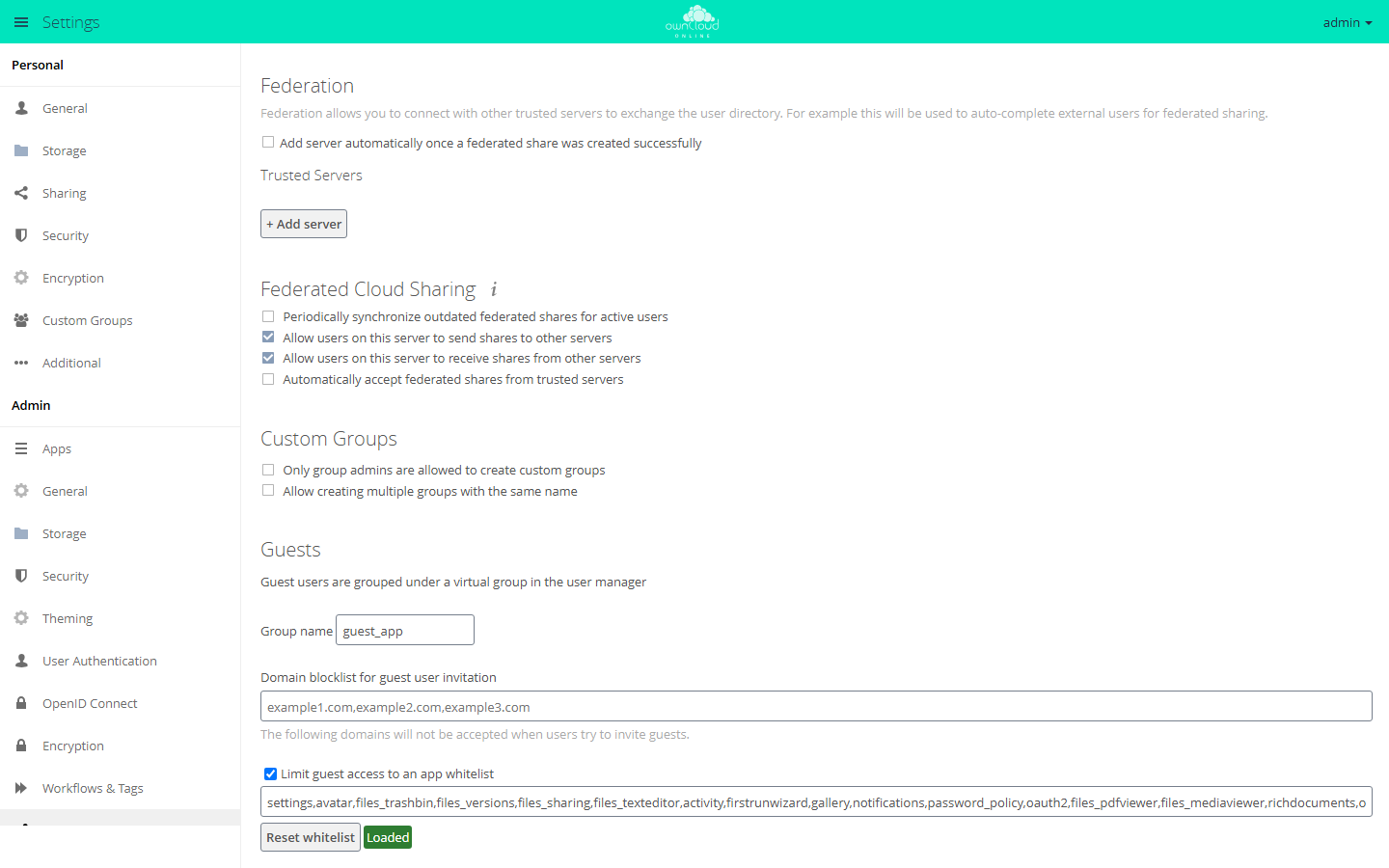
The Federated Cloud Sharing section comes from the federatedfilesharing
app, but most of its keys belong to the files_sharing app.
| Label | Key | App | Default |
|---|---|---|---|
| Allow users on this server to send shares to other servers | outgoing_server2server_share_enabled |
files_sharing |
yes |
| Allow users on this server to receive shares from other servers | incoming_server2server_share_enabled |
files_sharing |
yes |
| Periodically synchronize outdated federated shares for active users | cronjob_scan_external_enabled |
files_sharing |
no |
| Automatically accept federated shares from trusted servers | auto_accept_trusted |
federatedfilesharing |
no |
sudo -u www-data php8.4 occ config:app:set files_sharing outgoing_server2server_share_enabled --value no
sudo -u www-data php8.4 occ config:app:set files_sharing incoming_server2server_share_enabled --value no
The federation app maintains the list of trusted servers itself, in the
Trusted Servers section. It has its own key, which stores 0 and 1
instead (apps/federation/lib/TrustedServers.php):
| Label | Key | App | Default |
|---|---|---|---|
| Add server automatically once a federated share was created successfully | autoAddServers |
federation |
0 |
A separate command removes orphaned storages left behind by deleted federated shares:
sudo -u www-data php8.4 occ sharing:cleanup-remote-storages
Password policy
The password_policy app hooks into the core's password check. When a link
password is set, the core fires the OCP\Share::validatePassword event
(lib/private/Share20/Manager.php, verifyPassword). The app checks the
password and rejects it with a message if needed.
The two mechanisms have separate jobs:
- The
shareapi_enforce_links_password_*switches decide whether a password is required. - The policy decides what the password has to look like.
Without the password_policy app there is no strength check. The core does not
have one.
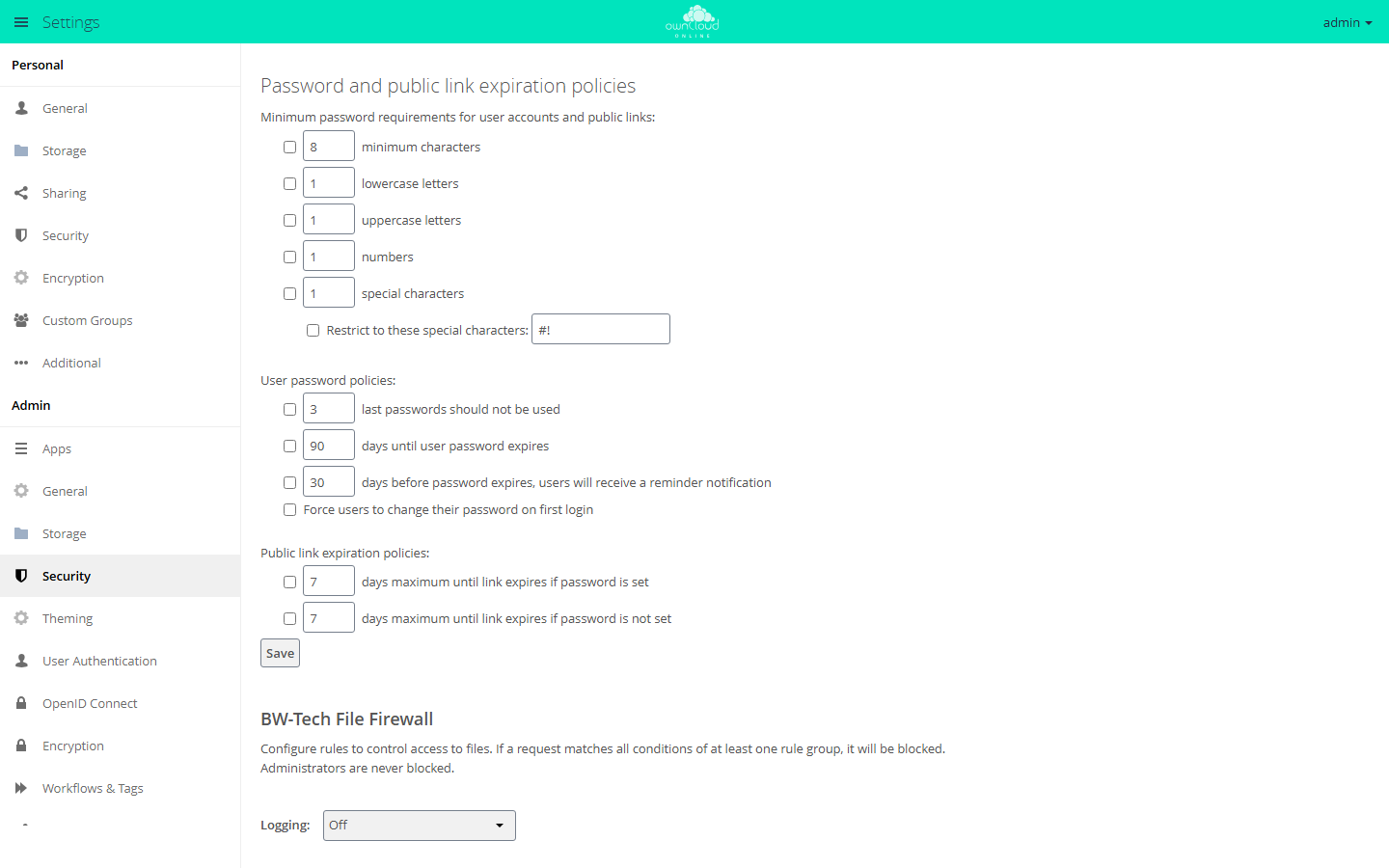
The Password and public link expiration policies panel is not under
Sharing but under Settings → Admin → Security. As the heading Minimum
password requirements for user accounts and public links says, the minimum
requirements apply to account passwords and link passwords alike. All keys
belong to the password_policy app and follow the pattern <name>_checked and
<name>_value. When a box is checked, the web interface stores on; an
unchecked box is stored as an empty value. When you set values with occ, use
only on: the expiration rules compare strictly against on
(lib/HooksHandler.php), while the password check treats any non-empty value
as on (lib/Engine.php, yes). To turn a rule off, delete the key.
| Label | Key pair | Default value |
|---|---|---|
| minimum characters | spv_min_chars_checked / spv_min_chars_value |
8 |
| lowercase letters | spv_lowercase_checked / spv_lowercase_value |
1 |
| uppercase letters | spv_uppercase_checked / spv_uppercase_value |
1 |
| numbers | spv_numbers_checked / spv_numbers_value |
1 |
| special characters | spv_special_chars_checked / spv_special_chars_value |
1 |
| Restrict to these special characters: | spv_def_special_chars_checked / spv_def_special_chars_value |
#! |
The app also adds its own expiration rules for public links that depend on the password:
| Label | Key pair | Default value |
|---|---|---|
| days maximum until link expires if password is set | spv_expiration_password_checked / spv_expiration_password_value |
7 |
| days maximum until link expires if password is not set | spv_expiration_nopassword_checked / spv_expiration_nopassword_value |
7 |
If one of these rules is on, the app requires an expiration date for link
shares and rejects any date beyond the configured number of days
(lib/HooksHandler.php, updateLinkExpiry). This is a second, independent
mechanism next to shareapi_enforce_expire_date. The stricter of the two rules
wins.
sudo -u www-data php8.4 occ config:app:set password_policy spv_min_chars_checked --value on
sudo -u www-data php8.4 occ config:app:set password_policy spv_min_chars_value --value 12
Guests
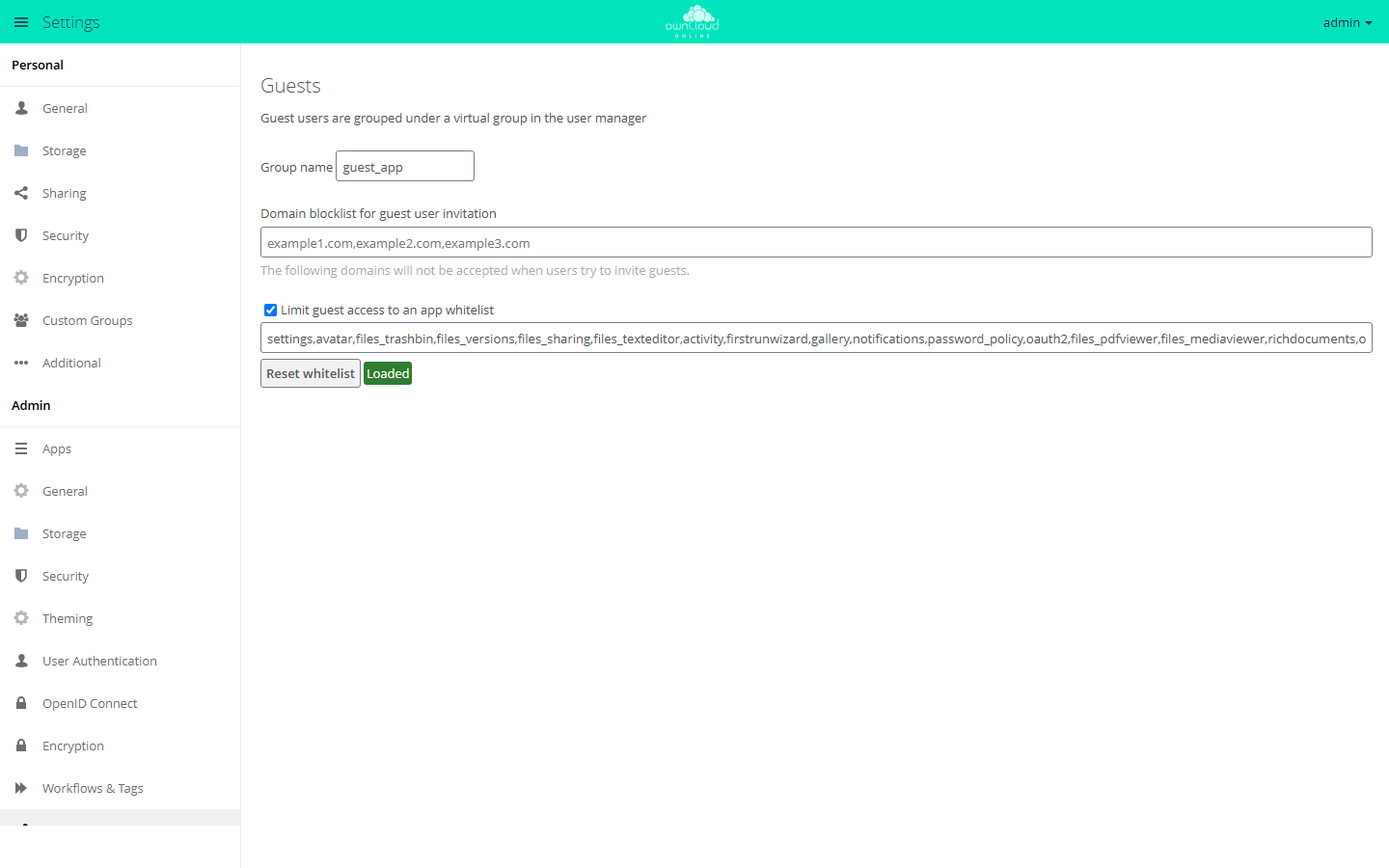
If the guests app is enabled, the Sharing section also shows the Guests
panel. Guests are separate accounts that are marked with the isGuest user
setting and collected in a virtual group. Users invite them by email address in
the share dialog.
| Label | Key (app guests) |
Default |
|---|---|---|
| Group name | group |
guest_app |
| Domain blocklist for guest user invitation | blockdomains |
empty |
| Limit guest access to an app whitelist | usewhitelist |
true |
| Input field below the whitelist checkbox (no visible label; screen readers announce "App whitelist for guest access") | whitelist |
list in lib/AppWhitelist.php |
The whitelist switch stores the strings true and false, not yes and no.
The domain blocklist is a comma-separated list. It is checked when a guest is
created. The comparison uses the full domain after the @ and ignores upper
and lower case (lib/Controller/UsersController.php, isDomainBlocked).
sudo -u www-data php8.4 occ config:app:set guests blockdomains --value 'example.com,example.net'
Keep two interactions with the sharing rules in mind:
- The whitelist decides which apps a guest sees at all. It only applies to
accounts that are explicitly marked as guests (
lib/AppInfo/Application.php). Iffiles_trashbinorfiles_versionsis missing from the list, guests have neither Deleted files nor versions. - The restriction Restrict users to only share with users in their groups
is deliberately skipped for guests: the server allows sharing with a guest
even if there is no common group (
lib/private/Share20/Manager.php,userCreateChecks).
Checking values
# read a single value
sudo -u www-data php8.4 occ config:app:get core shareapi_enabled

# all sharing keys of the core at a glance
sudo -u www-data php8.4 occ config:list core

# reset a value to the built-in default
sudo -u www-data php8.4 occ config:app:delete core shareapi_enforce_expire_date
Prefer config:app:delete over setting what looks like the default value.
After deleting, the default from the code applies again, even if it changes in
a later version.
Troubleshooting
| Symptom | Cause | Fix |
|---|---|---|
| The enforced expiration date has no effect | shareapi_enforce_expire_date is only evaluated if shareapi_default_expire_date is yes |
Set both keys, not just the enforce switch |
| Some links still get through without a password | Passwords are enforced per role, and only one of the four shareapi_enforce_links_password_* keys is set |
Set all four keys to yes |
| Expired shares are still visible | The cleanup job runs once a day and needs a working cron | Check cron, see Background jobs (cron) |
| An excluded group can still share | shareapi_exclude_groups_list is not stored as a JSON array, or shareapi_exclude_groups is no |
Set the list as '["group"]' and turn the switch on |
| A group can still create shares even though it is on the recipient blacklist | blacklisted_receiver_groups only blocks receiving, not sharing |
Also use shareapi_exclude_groups_list |
| Public links are allowed, but nobody can create one | public_share_sharers_groups_allowlist_enabled is yes, and the user's group is missing from public_share_sharers_groups_allowlist |
Add the group to public_share_sharers_groups_allowlist or turn the switch off |
| The desktop or mobile client reports a group restriction that the server does not enforce | The capabilities report the default yes for shareapi_only_share_with_group_members and shareapi_only_share_with_membership_groups, while enforcement in the core assumes no |
Set both keys explicitly instead of relying on the default |
| A link password is rejected even though it is long enough | The password_policy app also checks character classes |
Read the message in the dialog and adjust the policy under Admin → Security |
| A link cannot be saved because an expiration date is missing | An expiration rule of the password_policy app is on and requires a date |
Set an expiration date, or turn off spv_expiration_password_checked or spv_expiration_nopassword_checked |
| A guest cannot be invited | The domain is listed in guests/blockdomains |
Remove the entry or use a different address |
| A guest has no Deleted files and no versions | files_trashbin or files_versions is missing from the guest whitelist |
Add them to the whitelist or set guests/usewhitelist to false |
| The Federated Cloud Sharing panel is missing | The federatedfilesharing app is not enabled |
Enable the app or set the keys directly with occ |