

Calendar
API key required
The Marketplace lists this app only for instances with a valid API key. You get the key from BW-Tech GmbH on request. To enter it, open Market → Settings → Add API Key from the app menu, paste the key into the "Your personal API Key" field, and click "Save". The app then appears in the catalog. For details, see Market: Enter an API key. App ID: calendar. This page describes version 2.2.2.
Calendar is the web interface for the CalDAV server built into owncloud.online. Users see and edit the appointments that phones, Thunderbird, or other CalDAV clients sync, and whatever they create in the browser shows up on their devices. Calendars can be shared with people and groups and published through a link.
Requirements
| Component | Requirement |
|---|---|
| owncloud.online | 11.x |
| PHP | 8.4 with the curl extension (for subscriptions) |
Core app dav |
enabled (on by default); it provides the CalDAV server |
| for "Email link to person", see Sending email | |
| Network | outgoing HTTP and HTTPS connections to subscribed calendars |
| Browser | a current version of Firefox, Chrome, Edge, or Safari |
Installation
- Enter the API key, see the box above.
- In the app menu, open Market, go to the app, and install it, or use the command line:
sudo -u www-data php8.4 occ market:install calendar
"Calendar" then appears in the app menu. The app has no tables of its own. Appointments, calendars, shares, and subscriptions are stored in the CalDAV storage of the core.
Data from an older instance
If the database comes from an instance with Calendar app 2.1.0 or older, the instance asks
for an upgrade after occ app:enable calendar. Until then, the login shows the update
page and CalDAV answers everyone with 503. So run the upgrade once afterwards:
sudo -u www-data php8.4 occ app:enable calendar
sudo -u www-data php8.4 occ upgrade
If you install the app with occ market:install, the command records the version itself
and no upgrade is needed. If the calendar was limited to certain groups in the old
instance, that restriction is lost during the move. Restore it with
sudo -u www-data php8.4 occ app:enable calendar --groups=<group>.
Configuration
The app has no section of its own in the settings. Three values control it:
| Value | Location | Default | Effect |
|---|---|---|---|
allow_local_remote_servers |
config/config.php |
false |
Allow subscriptions from servers on your own network |
webcal_max_size_mb |
app value of calendar |
10 | Largest allowed subscription file in MiB (1 to 1024) |
sendmail_hourly_limit |
app value of calendar |
10 | Emails per person and hour for "Email link to person" (1 to 1000) |
sudo -u www-data php8.4 occ config:app:set calendar webcal_max_size_mb --value=20
sudo -u www-data php8.4 occ config:app:set calendar sendmail_hourly_limit --value=20
Subscriptions
The server fetches subscribed calendars through a proxy built into the app. Allowed
schemes are http, https, webcal, and webcals; the app fetches webcal and
webcals over HTTPS. By default, the proxy refuses every target whose address, after DNS
resolution, is not public or belongs to this server. That way nobody can use a
subscription to reach services on the internal network.
To subscribe to calendars from a server on your own network on purpose, allow it in
config/config.php:
'allow_local_remote_servers' => true,
This applies to all accounts of the instance. Set it only if all users are trusted or the
internal network offers no unprotected services. The other limits still apply: 10 seconds
to connect, 30 seconds per request, 45 seconds in total, and at most 5 redirects. The
response must start with BEGIN:VCALENDAR.
If config/config.php contains an outgoing proxy (proxy), that proxy resolves the
names. The app still checks the addresses but can no longer pin the connection to the
checked address, so the proxy itself must block targets on the internal network. The app
ignores proxy variables from the environment such as HTTPS_PROXY.
Public links
Publishing, embedding, and "Email link to person" follow the rules for public links under Settings → Admin → Sharing, see Sharing policies:
- "Allow apps to use the Share API" and "Allow users to share via link" must be on.
- If the owner of a calendar is excluded from sharing ("Exclude groups from sharing"), they cannot publish, and their public pages are not reachable.
- If the server requires a password for read-only links
(
shareapi_enforce_links_password_read_only), new publishing is blocked, because calendar links cannot have a password. The calendar list shows the reason. Calendars that are already published stay reachable and can be unpublished.
The instance sends link emails from its general sender address
(mail_from_address@mail_domain). Replies go to the email address of the person who sent
the link, if they have one. For the hourly limit to count exactly, the core file locking
must be active (filelocking.enabled, with Redis as memcache.locking recommended).
Embedding on other websites
The app removes the X-Frame-Options header only for the addresses
/apps/calendar/embed/<token> and /apps/calendar/public/<token>. If the web server sets
the header itself, embedding stays blocked. This affects Apache with mod_headers
through the server's .htaccess (Header always set X-Frame-Options "SAMEORIGIN") and an
add_header X-Frame-Options in nginx or an upstream proxy. Exclude the two addresses
there.
CalDAV clients
| Client | Address |
|---|---|
| CalDAV clients in general (Thunderbird, DAVx⁵, and others) | https://<instance>/remote.php/dav |
| iOS and macOS | https://<instance>/remote.php/dav/principals/users/<user>/ |
The app shows both addresses under "Settings & import" as "Primary CalDAV address" and "iOS/OS X CalDAV address".
Usage
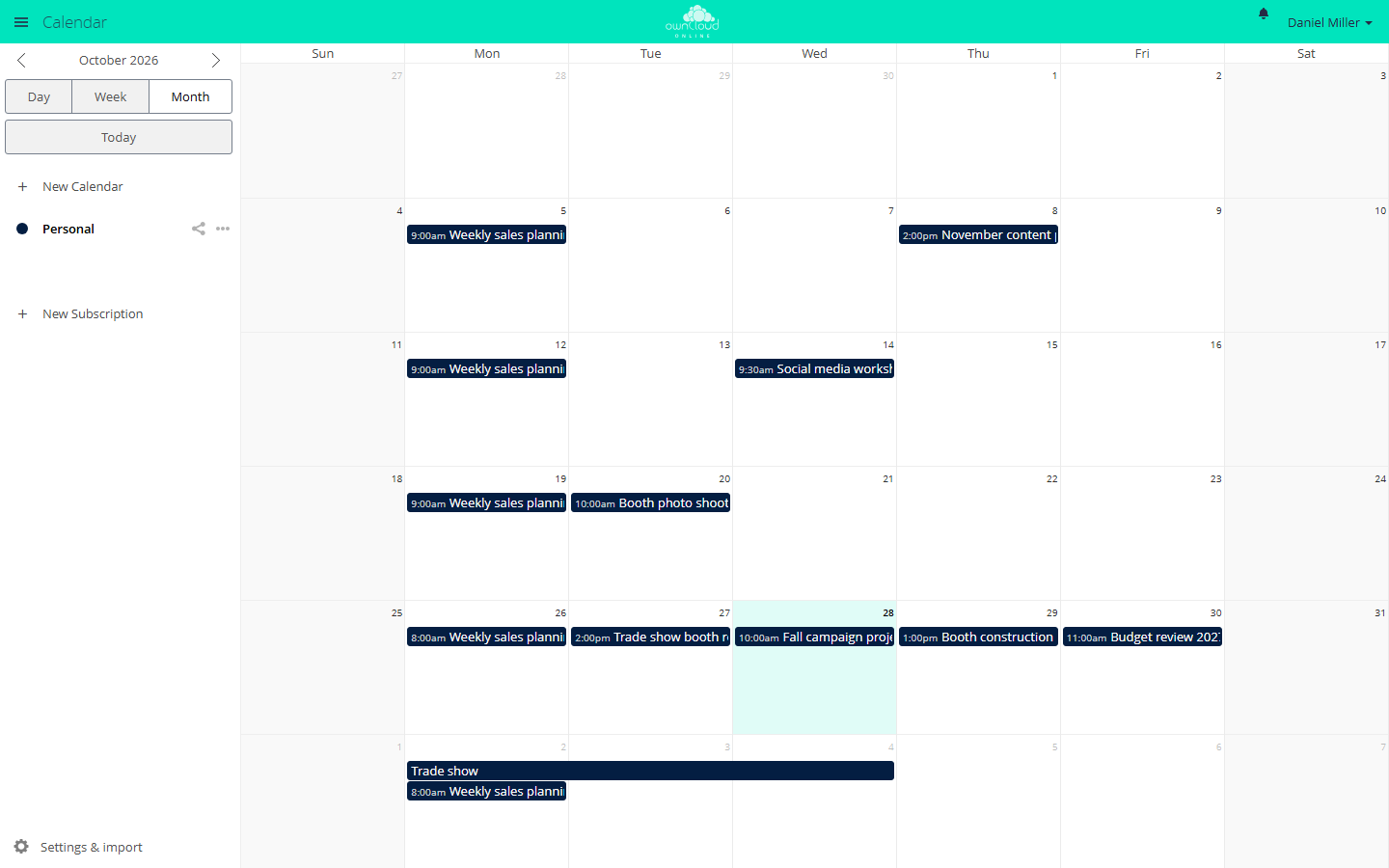
- Create an appointment: click into the view, type a title, and save. "More ..." opens all fields: location, description, reminders, recurrence, and attendees. You can move and resize appointments with the mouse.
- Share a calendar: the "Share Calendar" icon next to the calendar opens the sharing area. In the "Share with users or groups" field, pick the recipients. With "can edit", they may change appointments.
- Publish: in the same area, "Share link" turns on a public page. "Email link to person" sends the address to an email address. On the public page, "Embed" shows the code for other websites ("Iframe to integrate").
- Subscribe: "New Subscription" accepts a
webcal://orhttps://address. - Import and export: "Settings & import" → "Import calendar" reads
.icsfiles. "Download" in the calendar's menu saves it as an.icsfile. - Invite attendees: your own email address must be set in your personal settings.
Limits and notes
- The app stores reminders only in the appointment. The synced devices and CalDAV clients trigger them. Neither the web interface nor the server sends reminders, not even by email.
- For recurring events with more complex rules created by other programs, the editor shows "This event's repeating rule is not supported yet."
- If someone with write permission publishes a shared calendar over CalDAV, the app
answers that link with 404. The core CalDAV endpoint
public-calendarsstill serves it. The owner sees the calendar as published and can unpublish it. - The app shows accounts from the system address book only according to the rules of the
share dialog. Search terms shorter than
user.search_min_length(default 2) return nothing, and a search returns at most 25 results. - Users choose calendar names and display names freely. Both appear in the subject and
body of the email that "Email link to person" sends from the instance's sender address
to any address. If that is too much of a phishing risk for you, lower
sendmail_hourly_limitor turn off public links.