

Security and setup warnings
The setup warnings under Settings → Admin → General ("Security & setup warnings") point to missing production configuration. On a production system, do not ignore any of them.
HTTPS
Production systems must run over HTTPS.
certbot --apache -d cloud.example.com
Then set:
sudo -u www-data php8.4 occ config:system:set overwrite.cli.url --value https://cloud.example.com
If the instance runs behind a reverse proxy, also follow Reverse proxy and TLS.
System cron
crontab -u www-data -e
Entry:
*/15 * * * * /usr/bin/php8.4 /var/www/owncloud.online/occ system:cron
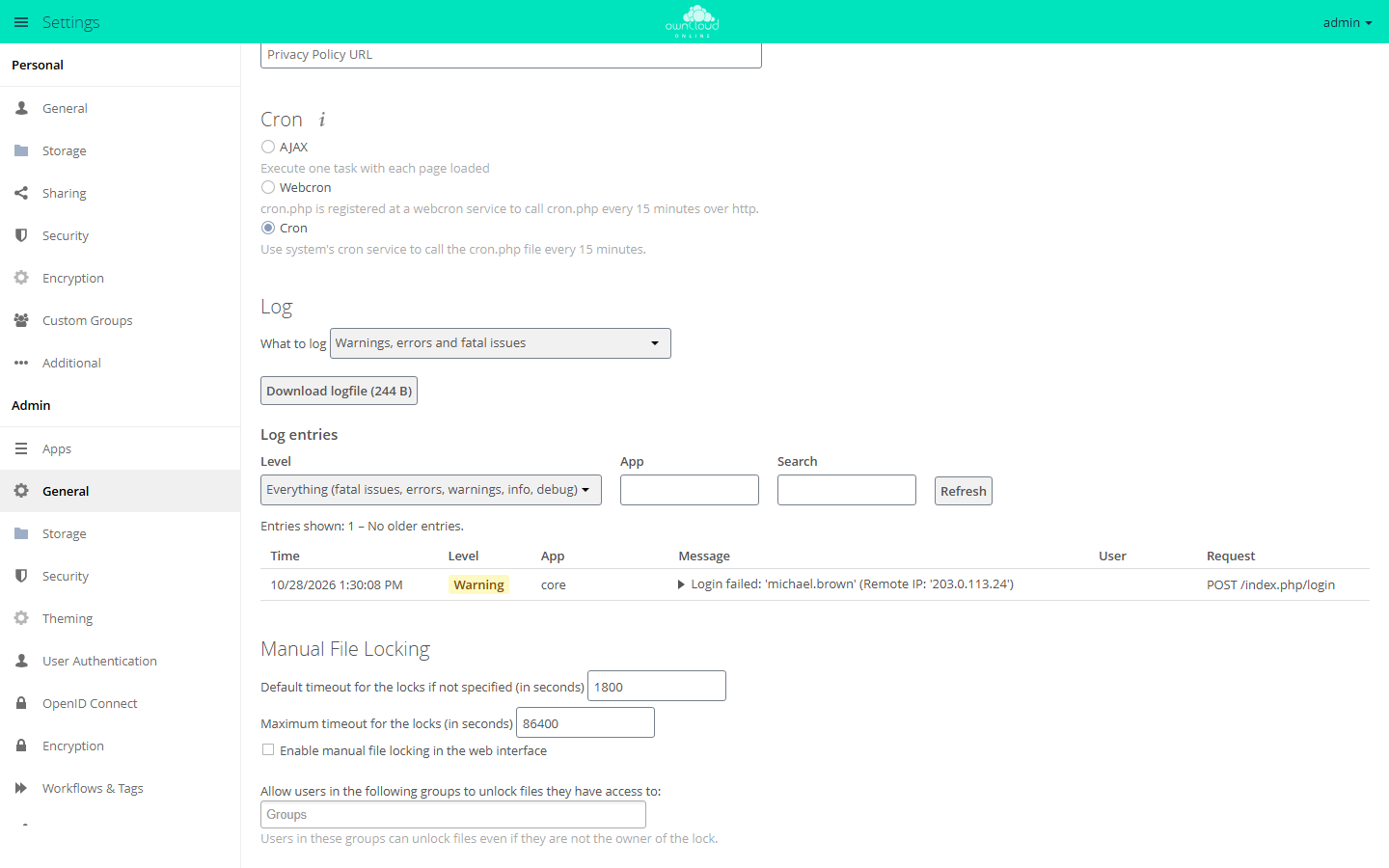
Switch owncloud.online to cron:
sudo -u www-data php8.4 occ background:cron
In the web interface, this is the "Cron" option under Settings → Admin →
General. Its description mentions cron.php. occ system:cron runs the same
jobs but does not print a notice on every run, which cron would send as an
email. Details are in Background jobs (cron).
Memory cache (APCu)
apt install -y php8.4-apcu
systemctl reload php8.4-fpm
config/config.php:
'memcache.local' => '\\OC\\Memcache\\APCu',
Without memcache.local, the cache factory falls back to NullCache
(lib/private/Memcache/Factory.php). The caches for translations and app
information then have no effect either: every language file and every
info.xml is parsed again on every request. For occ and cron.php to use
the cache as well, APCu must be enabled in the CLI php.ini:
apc.enable_cli=1
File locking with Redis
On production systems, Redis handles transactional file locking:
apt install -y redis-server php8.4-redis
systemctl enable --now redis-server
systemctl reload php8.4-fpm
config/config.php:
'memcache.locking' => '\\OC\\Memcache\\Redis',
'redis' => [
    'host' => '127.0.0.1',
    'port' => 6379,
    'timeout' => 1.5,
],
timeout limits the connection attempt to 1.5 seconds. Without it, every
request waits for the operating system's TCP timeout when Redis is
unreachable, see Troubleshooting.
Database
SQLite is only suitable for local tests. Production systems use MariaDB or MySQL, see Database.
Integrity check
owncloud.online ships on the bwtech channel (version.php). For this
channel, the core does not enforce the code integrity check
($notSignedChannels in lib/private/IntegrityCheck/Checker.php), and the
release package contains no signature files. Both check commands therefore
always report success without checking a single file:
sudo -u www-data php8.4 occ integrity:check-core
sudo -u www-data php8.4 occ integrity:check-app market
They are useless as a check after an update. Verify the release package before you unpack it instead:
-
SHA256SUMS.txtin the release contains the SHA-256 checksums of the archives. The check withsha256sum --ignore-missing -c SHA256SUMS.txtmust printOK, see Linux server installation, step 5. -
The release archives come with a signed build provenance attestation. It proves that the archive was built from the public repository. You can check it with the GitHub command line tool
gh:bashgh attestation verify owncloud-online-11.0.25.tar.gz \ --repo BWTECH-github/owncloud.online
The Market app checks apps from the Marketplace against the SHA-256 checksum from the catalog when it downloads them, if the catalog provides one.
Your own changes to core files, for example for branding, are not reported by the check. Keep a written record of such changes: an update replaces the program directory and with it the changed files.
Hiding version information
status.php returns the exact version and edition without a login, with
Access-Control-Allow-Origin: *. Together with the detailed CHANGELOG, this
makes instances without current security fixes easy to find. Recommended for
production instances:
'version.hide' => true,
After that, status.php returns the fields version, versionstring,
edition, productname, and product empty. The trade-off: monitoring that
reads the version from status.php no longer sees it.
Update check
By default, the update checker queries the update server of the upstream
project (the default value of updater.server.url) with the channel bwtech.
That service knows neither the channel nor the owncloud.online versions.
Administrators therefore never get an update notice, but with every check
the instance sends its version, installation and update time, channel,
edition, and build to a third-party server. Set your own endpoint
('updater.server.url' => '…') or turn the check off:
'updatechecker' => false,
New versions are published at https://github.com/BWTECH-github/owncloud.online/releases.
PHP security updates
Since 11.0.24, the security and setup warnings report a PHP version that lacks the fixes for CVE-2026-109618 and CVE-2026-109619. These vulnerabilities in the PHP interpreter let attackers run code on the server without logging in. For PHP 8.4, they are fixed in 8.4.27 and later. The warning starts with "This server runs PHP …".
For a PHP build without a suffix in the version number, the message is an error. For distribution packages (a version number with a suffix, for example from Debian or Ubuntu), it is only a warning, because distributions often ship such fixes under the old version number. Once the fix is installed that way, this entry hides the message:
'php_security_check' => false,
HSTS (Strict-Transport-Security)
The shipped .htaccess sets HSTS only if Apache terminates TLS itself
(env=HTTPS, set by mod_ssl):
Header always set Strict-Transport-Security "max-age=15552000; includeSubDomains" env=HTTPS
nginx and reverse proxies: nginx ignores .htaccess, and behind a proxy
that terminates TLS, the backend only sees HTTP. There, the proxy or nginx must
set the header, and only in one place, or it is sent twice:
add_header Strict-Transport-Security "max-age=15552000; includeSubDomains" always;
Before you set it, make sure that all subdomains will be reachable over
HTTPS permanently: browsers enforce HSTS for the duration of max-age. Add
preload only after testing.
Reverse proxy: trusted_proxies
Behind a reverse proxy, the server sees the proxy as the sender of every
request. The real client address is then in X-Forwarded-For. The server
evaluates this header only for addresses listed in trusted_proxies:
'trusted_proxies' => ['10.0.0.5'],
'overwriteprotocol' => 'https',
This matters for security because several protection mechanisms use the client address as a key, above all brute-force protection for logins, public link passwords, and the MCP endpoint. It counts failed attempts per (IP, account).
| Setup | Result |
|---|---|
trusted_proxies set correctly |
The real client address is counted, protection works |
trusted_proxies not set |
All requests count against the proxy address, legitimate users slow each other down |
The proxy appends to X-Forwarded-For instead of setting it |
An attacker sends the header themselves and gets a new "address" with every request, and the throttle never applies |
| App server reachable directly from the network | Requests bypass the proxy. The server evaluates X-Forwarded-Proto and X-Forwarded-Host without checking trusted_proxies, so the protocol and host name of generated links can be influenced from outside |
Two steps therefore belong in every setup:
- Set
trusted_proxiesto the actual proxy addresses (no network ranges "just in case", no0.0.0.0/0). - Never expose the PHP-FPM or app server directly. It must only be
reachable through the reverse proxy (firewall or binding to
127.0.0.1).
The log shows which address actually arrives: after a failed login, it is in
the remoteAddr field, see Server log and error messages. If
the log shows the proxy address instead of the client address,
trusted_proxies is wrong. All details are in
Reverse proxy and TLS.
Brute-force protection
The core slows down repeated failed attempts at login (web interface as well as WebDAV and OCS with HTTP basic auth), for public link passwords, and at the MCP endpoint. It counts the failed attempts of the last 12 hours in three dimensions and applies the strictest:
| Counted per | Without delay | After that |
|---|---|---|
| Address and identifier (account name or share token) | 3 failed attempts | 5 seconds, doubling with every further failed attempt, at most 120 seconds |
| Address, across all identifiers | 20 failed attempts | same as above |
Subnet (/24 for IPv4, /64 for IPv6) |
20 failed attempts | at most 10 seconds |
There is no permanent lockout; every delay expires on its own. Meanwhile, the login page shows "Login paused for a moment" and the remaining time.
To set the values yourself, install the
Brute-Force Protection app
(brute_force_protection) from the Marketplace. Since 11.0.14, the core then
leaves the rules for logins and link passwords to the app. The settings are
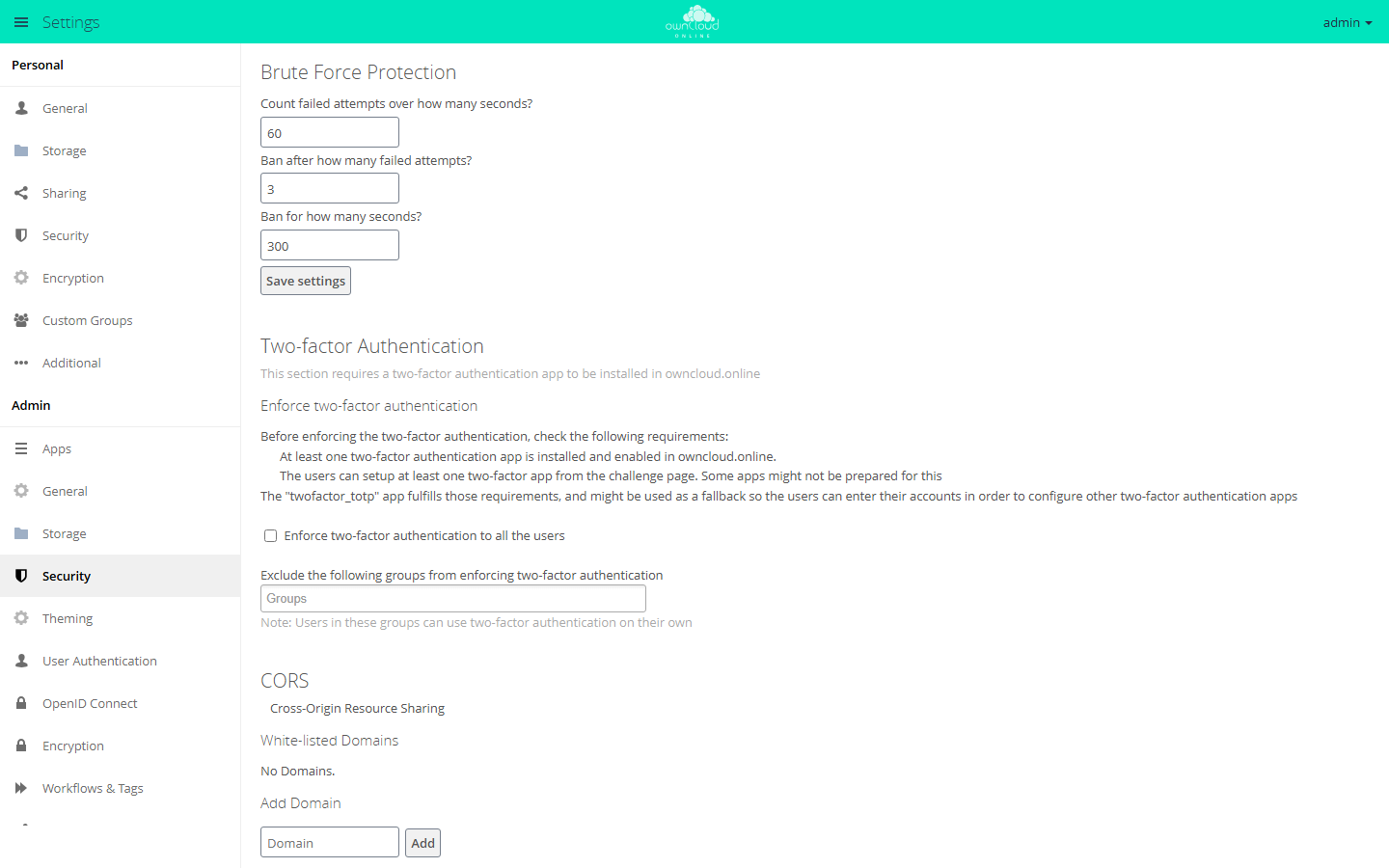
under Settings → Admin → Security in the "Brute Force Protection" section:
| Field | Meaning | Default |
|---|---|---|
| "Count failed attempts over how many seconds?" | Time window in seconds in which failed attempts count | 60 |
| "Ban after how many failed attempts?" | Number of failed attempts before the ban | 3 |
| "Ban for how many seconds?" | Duration of the ban in seconds | 300 |
Password policy
The Password Policy app
(password_policy) from the Marketplace sets minimum requirements for
passwords:
sudo -u www-data php8.4 occ market:install password_policy
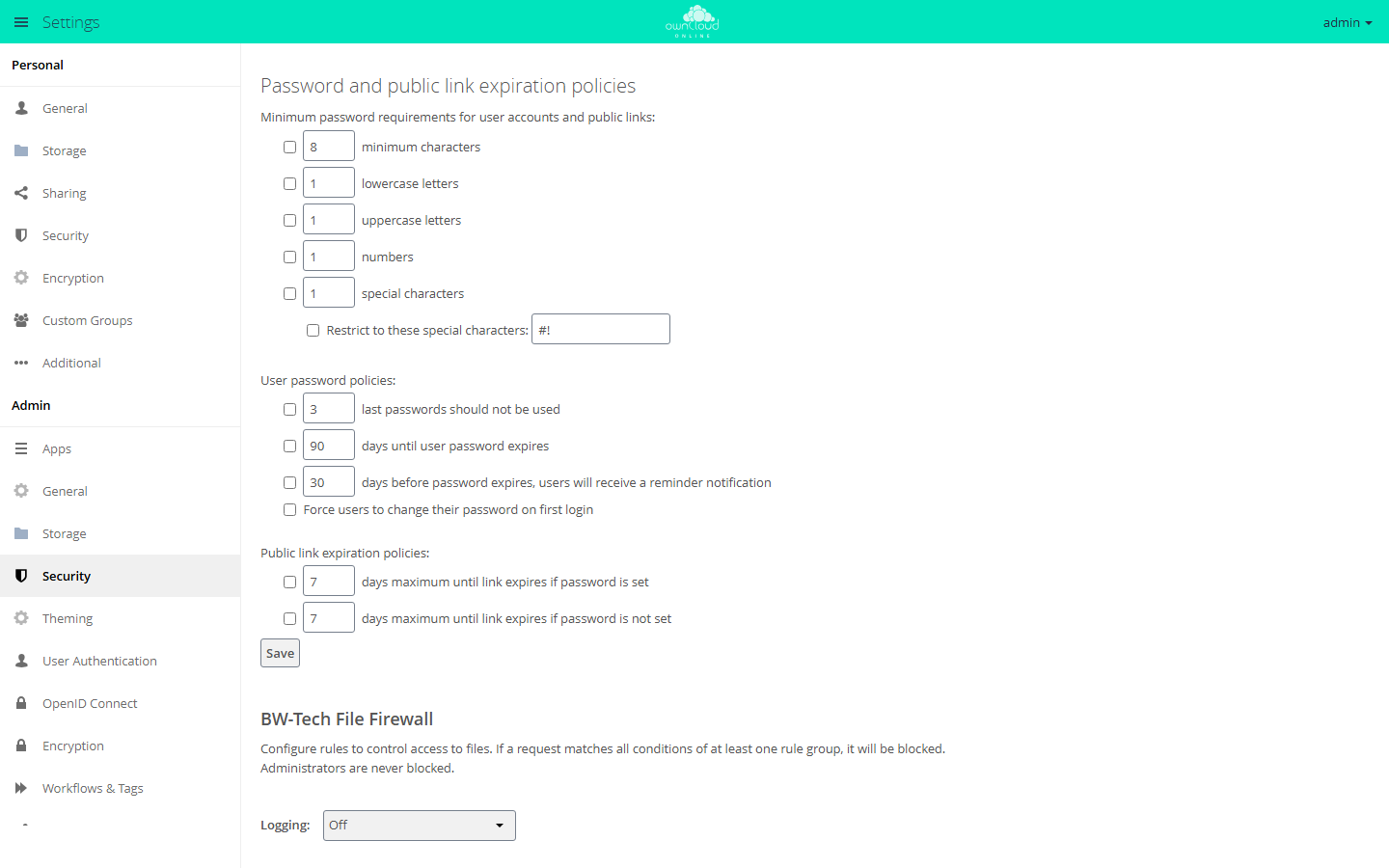
The settings are under Settings → Admin → Security in the "Password and public link expiration policies" section. Each rule takes effect only when the checkbox in front of it is selected:
- Minimum length, lowercase and uppercase letters, numbers, and special characters, optionally restricted to specific special characters. This applies to accounts and to public link passwords.
- For user accounts: blocking recently used passwords, expiration after a number of days, a reminder before expiration, and a forced password change at first login.
- For public links: the maximum number of days until expiration, separately for links with and without a password.
PHP upload progress
PHP can record the progress of a form upload in the session
(session.upload_progress.enabled, on by default). owncloud.online does not
use this; the progress display in the browser does its own calculation. As
long as the feature is on, PHP writes data from the sender into the session
store for every upload with the form field PHP_SESSION_UPLOAD_PROGRESS, and
it does so without a login and before owncloud.online even sees the request.
This is a known building block for file inclusion attacks and also fills up
the session store.
Since 11.0.24, the shipped .user.ini (PHP-FPM, CGI) and .htaccess (Apache
with mod_php) turn the feature off. Both apply only to the owncloud.online
directory, and PHP-FPM rereads .user.ini only after up to five minutes
(user_ini.cache_ttl). In php.ini or the FPM pool, the setting applies
server-wide and takes effect as soon as you run systemctl reload php8.4-fpm:
; php.ini
session.upload_progress.enabled = Off

; or in the pool, e.g. /etc/php/8.4/fpm/pool.d/www.conf
php_admin_flag[session.upload_progress.enabled] = off
The value that counts is the one phpinfo() shows as "Local Value" in the
"session" section. The CLI (php -i, occ) has its own php.ini and tells
you nothing about it.