

Building a release
A release of owncloud.online consists of two archives of the server and the
files you need to verify their contents and origin. It is not built by hand: a
Git tag triggers the workflow .github/workflows/release-owncloud-online.yml.
It creates the archives, adds checksums, a software bill of materials (SBOM),
and a manifest, and publishes everything as a GitHub release. Finished releases
are at https://github.com/BWTECH-github/owncloud.online/releases; the
current version is 11.0.25.
If you do not build anything and only want to verify a downloaded archive, you only need the section Verifying authenticity.
Step 1: Set the version
version.php in the root directory is the only place where the core version is
defined. Everything else derives from it, including the name of the release
archives when a run starts on main without a tag and without a version
entered.
| Field | Meaning |
|---|---|
$OC_Version |
Four-part version number, for example [11, 0, 25, 0]. According to the comment in the file, the fourth part is not part of the public version number; it triggers database updates between pre-releases and the final release |
$OC_VersionString |
The human-readable version, for example 11.0.25. The release workflow reads this value when it runs on main without a tag and without a version entered |
$OC_VersionCanBeUpgradedFrom |
The oldest versions from which an upgrade is allowed |
$OC_Channel |
Release channel, bwtech in the repository. The build overwrites it with the value of RELEASE_CHANNEL |
$OC_Build |
Empty in the repository. The build writes the timestamp and commit here |
$vendor |
Publisher of the package |
When you bump the version, change the third part of $OC_Version and
$OC_VersionString together. If they drift apart, the instance reports a
different version after the update than the one in the archive name.
Step 2: Write the changelog
Every change gets its own file in the changelog/unreleased/ directory.
changelog/TEMPLATE and changelog/README.md describe the format and the
allowed types: a header line with type and title, then a descriptive
paragraph, and finally the related links. The types are Bugfix, Change,
Enhancement, and Security.
CHANGELOG.md summarizes the entries per version. The file starts with a
table of contents, followed by one section per version, newest first, for
example "Changelog for owncloud.online [11.0.25] (2026-10-28)" with the parts
Summary and Details. With each release, the section for the new version is
added at the top. changelog/README.md also describes moving the entries from
unreleased/ into a folder named <version>_<yyyy-mm-dd>; there are no such
folders for the 11.0.x versions.
CHANGELOG.md and README.md are not included in the release: the build
removes both from the archive and records them in removed-release-files.txt.
The release notes on GitHub summarize the changes and point to CHANGELOG.md
in the repository for the details.
Step 3: Check the prerequisites
The release build has one gate where it always stops: the minified files. In
production, the server delivers the .min version next to the JavaScript and
CSS files from core/, settings/, and apps/. If it differs from the
source, the release would ship old code. So before tagging, run:
make minify-assets
git status --porcelain -- '*.min.js' '*.min.css'
The second command must print nothing. If it lists files, commit them together
with the source change. make check-minified does both in one step and
stops when something differs. The tool versions matter: the workflow and the
check use terser@5.49.1 and clean-css-cli@5.6.3. Other versions produce
different bytes and therefore a difference that trips the gate.
The other CI checks (commit format, code style, unit and JavaScript tests, the
upgrade test of an existing installation) run on pushes to main and in pull
requests, not on the tag. The tag only builds. A state that is red on main
is built anyway, so check the latest run first.
Step 4: Set the tag
The workflow reacts to every tag that starts with v:
git tag -a v11.0.25 -m "owncloud.online 11.0.25"
git push origin v11.0.25
This starts the build. The workflow takes the version from the tag name
without the leading v.
You can also start a build by hand (Run workflow). It then accepts two
inputs: a version and the option Create a GitHub Release with the generated
files. If you leave the version empty, the workflow uses the name of the
branch the run starts on. If that is main or master, the workflow reads
$OC_VersionString from version.php instead (falling back to $OC_Version).
If that yields nothing either, the Resolve release version step fails.
Without the option, the files are not published; they stay attached to the
workflow run for seven days.
The build runs on Ubuntu with PHP 8.4 and Node.js 20. The workflow first
installs the PHP dependencies without development packages
(composer install --no-dev) and then runs
make -o build/node_modules dist-dir RELEASE_CHANNEL=bwtech.
-o build/node_modules skips yarn install: core/vendor is checked in and
is only copied. The workflow then removes development and tool files from the
result and packs it.
What is in the archive
Both archives contain a single directory, owncloud/, with everything the
installation needs: the core with its PHP dependencies, the bundled core apps
in apps/, and the Market app in apps-external/market/. No other apps are
included; the manifest says so.
Test and development files are removed in two steps:
make dist-dir does not copy tests/ and l10n/ and removes folders such as
test, doc, or examples from apps/, apps-external/, core/vendor/,
and lib/composer/. The workflow then removes node_modules/, .github/,
editor and tool folders, and individual files such as phpunit.xml,
phpstan.neon, phpcs.xml, package-lock.json, or yarn.lock.
Only the second step is recorded: removed-release-files.txt lists only its
paths. In 11.0.25 that is 22 entries, starting with README.md and
CHANGELOG.md. Anything that make dist-dir already leaves out does not
appear there, so the file does not answer every question about a missing file.
version.php in the archive differs from the repository in one place:
$OC_Build contains the build time and commit, while the field is empty in the
repository. The build also rewrites $OC_Channel, but with
RELEASE_CHANNEL=bwtech it contains the same value as in the repository.
Release artifacts
| File | Contents |
|---|---|
owncloud-online-<version>.tar.gz |
The server as a tar archive, about 57 MiB in 11.0.25 |
owncloud-online-<version>.zip |
The same content as a ZIP file, about 64 MiB, for environments without tar |
SHA256SUMS.txt |
SHA256 checksums of the two archives and the JSON files |
sbom-owncloud-online-<version>.cdx.json |
Bill of materials of all shipped components in CycloneDX format |
release-manifest.json |
Product name, version, commit, PHP version of the build, and the note that no additional apps are included |
removed-release-files.txt |
List of the paths the workflow removed from the archive after make dist-dir |
Verifying authenticity
Start with the checksums. If all release files are in the same directory, this is enough:
sha256sum -c SHA256SUMS.txt
If you downloaded only some of the files, sha256sum reports "No such file or
directory" for the others. In that case, run:
sha256sum --ignore-missing -c SHA256SUMS.txt
SHA256SUMS.txt covers four files: the two archives, release-manifest.json,
and the SBOM. Neither removed-release-files.txt nor the checksum file itself
is listed. The checksums only prove that the download arrived unaltered, not
who built it.
For the origin, there is the build provenance attestation (Sigstore, keyless through OIDC), which the workflow issues for the archives and the SBOM. Verify it with the GitHub CLI:
gh attestation verify owncloud-online-11.0.25.tar.gz \
  --repo BWTECH-github/owncloud.online
It ties the file to the workflow run that created it. Note: both the SBOM and the attestation are marked as "allowed to fail" in the workflow. If one of them is missing from a release, the corresponding step usually failed. Without the attestation, only the checksums remain, and they do not prove the origin.
To see which state an unpacked archive contains, run:
grep -E 'OC_VersionString|OC_Build' owncloud/version.php
The commit in $OC_Build must match the one in release-manifest.json.
Checks after installing
On a new installation:
sudo -u www-data php8.4 occ status
sudo -u www-data php8.4 occ app:list
occ status must report the same version as the archive name. The code
signature check (occ integrity:check-core) is not a useful test here: the
release channel bwtech is one of the channels for which
lib/private/IntegrityCheck/Checker.php does not enforce the check, and the
release build accordingly ships no signature. The command therefore exits
before it even looks for signature data: no output, exit code 0. A silent run
proves nothing here. The checksums in the section above verify the download.
When you update an existing installation, turn on maintenance mode before you
replace the directory. Otherwise someone may reach an instance whose code is
already new while its database is still old. occ upgrade does turn
maintenance mode on by itself, but only when it runs, which is after the
replacement. Maintenance mode that was
already on stays on afterwards (Maintenance mode is kept active), and you
have to turn it off by hand at the end:
sudo -u www-data php8.4 occ maintenance:mode --on
# only now copy in the unpacked directory
sudo -u www-data php8.4 occ upgrade
sudo -u www-data php8.4 occ maintenance:repair
sudo -u www-data php8.4 occ maintenance:mode --off
Backups, the order of the steps, and rolling back are covered in Backups and updates.
Apps are not part of the release
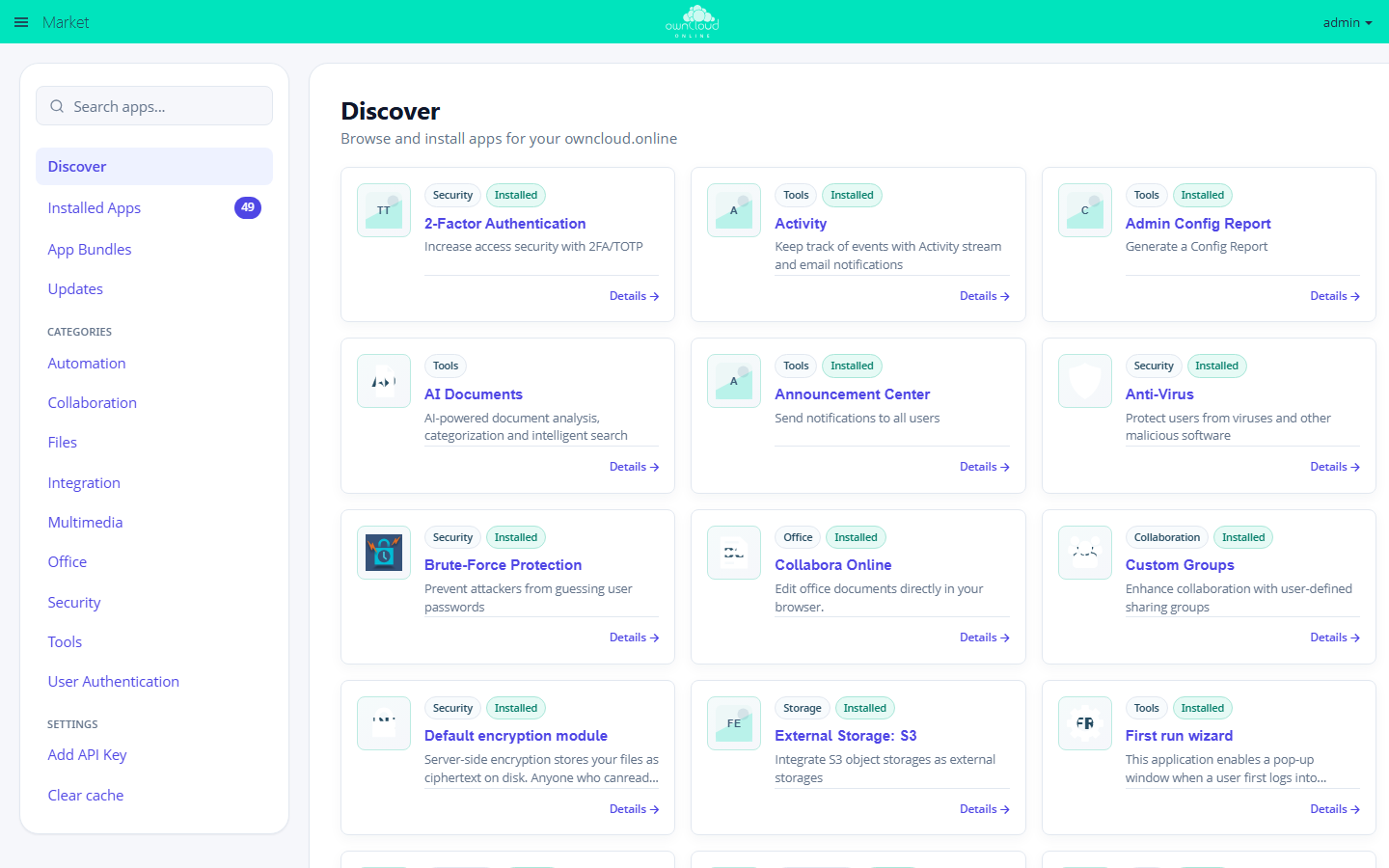
Since the archive contains only the core apps and the Market app, install all other apps afterwards: in the web interface through the app menu → Market (only administrators see this entry), or on the command line.
# list available apps
sudo -u www-data php8.4 occ market:list

# install an app from the Marketplace
sudo -u www-data php8.4 occ market:install <app_id>

# install a package you already have
sudo -u www-data php8.4 occ market:install --local /path/to/app.tar.gz

# install updates
sudo -u www-data php8.4 occ market:upgrade --all
The Marketplace shows some apps only with an API key. You get the key from BW-Tech GmbH and enter it in the Market app under Add API Key.
After a server update, check the apps: occ app:list shows enabled and
disabled apps, occ market:upgrade --list the available updates. See
Apps and Marketplace for details.
Building locally
The build step itself does not need the CI. You need PHP 8.4, Composer v2, and Node.js with the minifiers from step 3. To build the same way as the workflow:
rm -rf lib/composer
composer install --no-dev
make minify-assets
make -o build/node_modules dist-dir RELEASE_CHANNEL=bwtech
rm -rf lib/composer is intentional and matches the workflow: the package then
contains only the packages from composer install --no-dev, with no
development dependencies from make install-composer-deps and no leftovers
from earlier runs. To continue developing afterwards, restore the development
dependencies with make install-composer-deps.
The result is in build/dist/owncloud. It matches the state before the second
cleanup step and before packing; only the workflow creates the removal list
and the archives. A local build is never byte-identical to the published
archive anyway: $OC_Build contains the build time.
Without RELEASE_CHANNEL=bwtech, the build writes the default value git to
version.php.
Troubleshooting
| Symptom | Cause | Fix |
|---|---|---|
| The build stops with "Stale or uncommitted .min siblings detected" | A JavaScript or CSS file was changed without regenerating the .min version next to it |
Run make minify-assets and commit the generated files, using terser@5.49.1 and clean-css-cli@5.6.3; other versions produce different bytes |
| The Resolve release version step fails | Neither the tag nor the input provides a version, and version.php does not yield one |
Enter a version when starting the run, or set $OC_VersionString in version.php |
| The archive name contains a branch name instead of a version | Manual run on a branch other than main or master, without a version entered |
Run again with a version entered |
| The run succeeded, but there is no release | The run was started by hand without the option to create a release; the workflow publishes only for a tag or with that option | Set a tag, or run again with the option set; the files of the earlier run stay attached to that run for seven days |
The archive name shows a different version than version.php |
The tag takes precedence; version.php is only the fallback |
Update version.php before tagging, then set the tag again |
sha256sum -c reports "No such file or directory" |
Only some of the release files were downloaded | Check with --ignore-missing |
sha256sum -c reports "FAILED" |
Incomplete or altered download | Download the file again; if the error persists, do not use the file |
| The SBOM or the build attestation is missing from the release | Both steps are allowed to fail without stopping the build | Use the checksums; to get the missing files, run the build again |
After the replacement, occ reports "owncloud.online or one of the apps require upgrade - only a limited number of commands are available" |
The code is new, the database is still old | Run occ upgrade; the command is available in this state, see Backups and updates |
occ integrity:check-core prints nothing |
Releases from this workflow are not signed; for the bwtech channel, the core therefore does not enforce the check and skips it |
Expected behavior, not proof of anything about the archive. Verify authenticity with SHA256SUMS.txt and the build attestation |
| Apps are missing after the update | The release ships only the core apps and the Market app | Install the apps from the Marketplace, see above |
occ market:install reports "Installing apps is not supported because the app folder is not writable." |
The web server user cannot write to the app directory | Correct the permissions of the app directory |