

Sending email
owncloud.online sends email in several places: share invitations, password resets, new accounts, and calendar invitations. If email is not set up, these features fail, usually without a visible message. The error only shows up in the server log.
Run the occ commands on this page from the installation directory, for
example after cd /var/www/owncloud.online.
What fails without email
| Feature | Code | Behavior without email |
|---|---|---|
| Share invitation to internal users | lib/private/Share/MailNotifications.php |
The share is still created. The error is logged under sharing as "Can't send mail to inform the user about an internal share" |
| Share invitation to a link address | same | The app setting shareapi_allow_public_notification must also be yes. Otherwise sending is refused with "Public link mail notification is not allowed" (HTTP 403) |
| Forgotten password | core/Controller/LostController.php |
The user sees "Couldn't send reset email. Please contact your administrator." |
| Confirmation after a password change | core/Controller/LostController.php, settings/ChangePassword/Controller.php |
The password is changed, but no notification arrives |
| New account: link to set the password | settings/Controller/UsersController.php |
The account exists, but the user cannot get in |
| Confirming and changing your own address | settings/Controller/UsersController.php |
The address change stays unconfirmed |
| Calendar invitations (iMIP) | apps/dav/lib/CalDAV/Schedule/IMipPlugin.php |
Invitees receive nothing |
| Activity summaries | activity app, lib/MailQueueHandler.php |
The queue in the activity_mq table is never emptied |
Two limitations that often surprise people:
- The core does not send a separate warning before a share expires. The
expiration date is included in the invitation email (
createMailBody()inlib/private/Share/MailNotifications.php). No reminder follows. - Activity summaries are created by a background job of the
activityapp. Without a running cron they are never sent, see Background jobs (cron). To send them by hand:
sudo -u www-data php8.4 occ activity:send-emails
Setting up email in the web interface
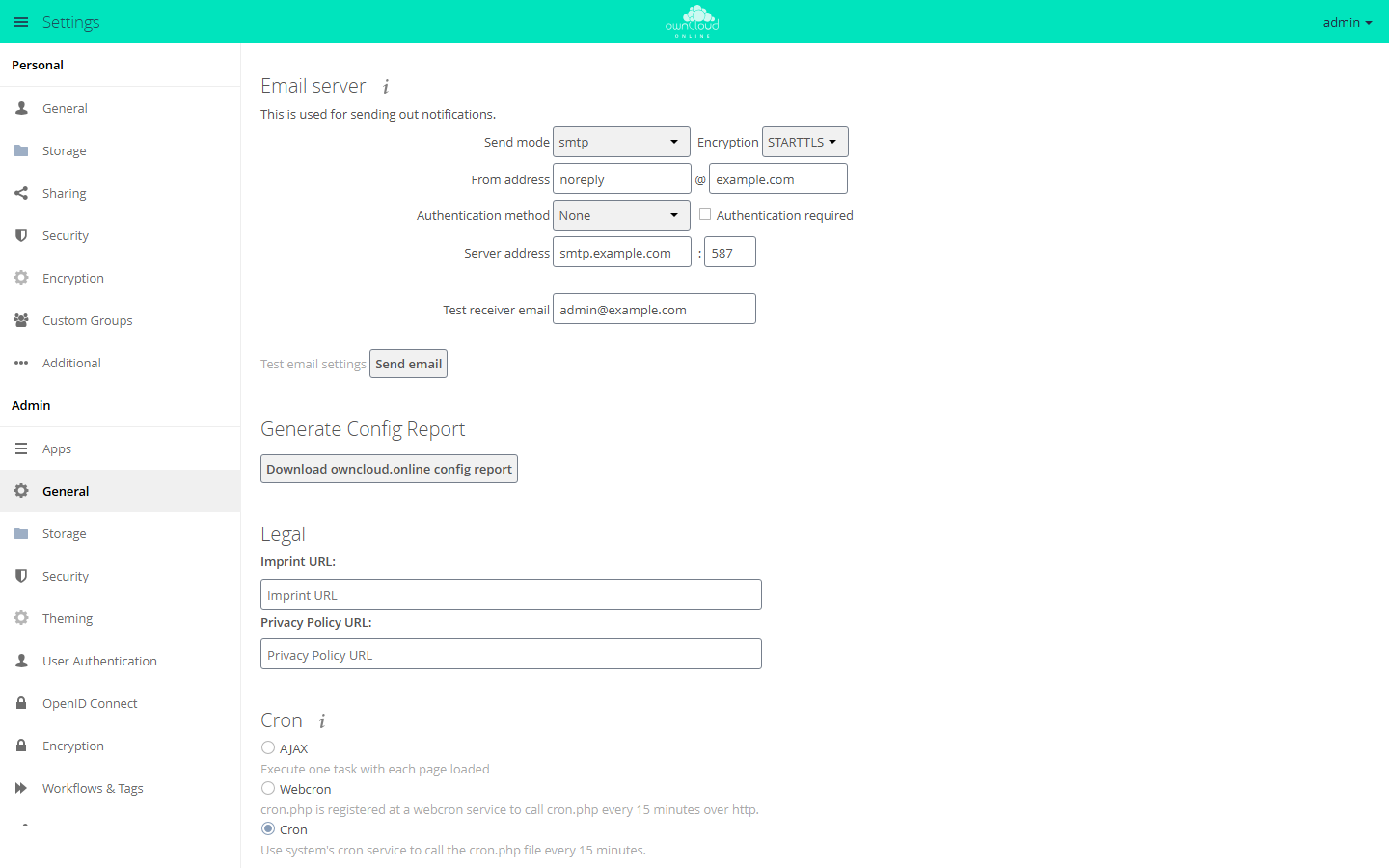
The Email server section is under Settings → Admin → General
(settings/Panels/Admin/Mail.php, section general).
| Field | Key | Notes |
|---|---|---|
| Send mode | mail_smtpmode |
Choices php and smtp; sendmail only appears if the program is found, qmail only if it is already set |
| Encryption | mail_smtpsecure |
None / SSL/TLS / STARTTLS, only visible in smtp mode |
| From address | mail_from_address and mail_domain |
Two fields separated by @ |
| Authentication method | mail_smtpauthtype |
Choices None / Login / Plain / NT LAN Manager |
| Authentication required | mail_smtpauth |
Shows the credential fields |
| Server address | mail_smtphost and mail_smtpport |
Two fields separated by a colon |
| Credentials | mail_smtpname, mail_smtppassword |
Fields SMTP Username and SMTP Password; saved only with the Store credentials button |
| Test receiver email | – | Not stored, only used for the test email |
The upper form saves every change immediately (settings/js/panels/mail.js
posts to /settings/admin/mailsettings on change). Username and password are
saved separately, and only when you click the button. If you turn
authentication off, MailSettingsController::setMailSettings() deletes the
username and password from the configuration.
If config_is_read_only is true, both forms disappear. In their place you see
"The config file is read only. Please adjust your setup by editing the config
file manually." together with a note about syncing config.php in a cluster.
You then have to edit config/config.php. The test field and the Send email
button stay visible.
Setting up email in config.php
A typical SMTP connection with STARTTLS on port 587:
sudo -u www-data php8.4 occ config:system:set mail_smtpmode --value smtp
sudo -u www-data php8.4 occ config:system:set mail_smtphost --value smtp.example.com
sudo -u www-data php8.4 occ config:system:set mail_smtpport --value 587 --type integer
sudo -u www-data php8.4 occ config:system:set mail_smtpsecure --value tls
sudo -u www-data php8.4 occ config:system:set mail_smtpauth --value true --type boolean
sudo -u www-data php8.4 occ config:system:set mail_smtpauthtype --value LOGIN
sudo -u www-data php8.4 occ config:system:set mail_smtpname --value noreply@example.com
sudo -u www-data php8.4 occ config:system:set mail_smtppassword --value 'CHANGE_ME'
sudo -u www-data php8.4 occ config:system:set mail_from_address --value noreply
sudo -u www-data php8.4 occ config:system:set mail_domain --value example.com
--type is required for mail_smtpport and mail_smtpauth. Otherwise the
values end up in the file as strings. Editing config/config.php directly has
the same effect:
'mail_smtpmode' => 'smtp',
'mail_smtphost' => 'smtp.example.com',
'mail_smtpport' => 587,
'mail_smtpsecure' => 'tls',
'mail_smtpauth' => true,
'mail_smtpauthtype' => 'LOGIN',
'mail_smtpname' => 'noreply@example.com',
'mail_smtppassword' => 'CHANGE_ME',
'mail_from_address' => 'noreply',
'mail_domain' => 'example.com',
Checking a value:
sudo -u www-data php8.4 occ config:system:get mail_smtphost
occ config:list system hides mail_smtphost, mail_smtpname,
mail_smtppassword, mail_from_address, and mail_domain because
lib/private/SystemConfig.php marks them as sensitive. config:system:get and
config:list system --private print them in plain text.
All mail_ keys
| Key | Default in the code | Meaning |
|---|---|---|
mail_smtpmode |
php |
Delivery method. Only smtp talks SMTP; every value other than smtp and qmail calls /usr/sbin/sendmail -bs |
mail_smtphost |
127.0.0.1 |
SMTP server address, smtp mode only |
mail_smtpport |
25 |
SMTP server port. The value 465 also turns on implicit TLS |
mail_smtpsecure |
empty | Any non-empty value means the connection must be encrypted. ssl and tls behave the same |
mail_smtpauth |
false |
Log in to the SMTP server |
mail_smtpauthtype |
LOGIN |
Login method. The code knows LOGIN, PLAIN, and CRAM-MD5 |
mail_smtpname |
empty | Username for the SMTP login |
mail_smtppassword |
empty | Password for the SMTP login |
mail_smtpdebug |
false |
Passes the server logger to the transport, so the SMTP dialog is logged at debug level |
mail_smtptimeout |
10 |
Has no effect: the line that would apply it is commented out in lib/private/Mail/Mailer.php |
mail_from_address |
not set | Local part of the sender address |
mail_domain |
not set | Domain of the sender address; if not set, the server's host name |
Send modes in detail (Mailer::getInstance() and
Mailer::getSendMailInstance()):
smtp: connects tomail_smtphost:mail_smtpport. After 100 messages the connection is reopened.qmail: calls/var/qmail/bin/sendmail -bs.php,sendmail, and any other value: calls/usr/sbin/sendmail -bs. Sophpmode does not use themail()function and does not use thesendmail_pathfromphp.ini, even though the description inconfig/config.sample.phpsuggests it. Without a local mail server (MTA), this fails.
Two more keys without the mail_ prefix belong here:
| Key | Default | Meaning |
|---|---|---|
remove_sender_display_name |
false |
Leaves the sharer's display name out of the sender of share emails. Helps with spam filters that treat "Name via owncloud.online" as spoofing |
allow_user_to_change_mail_address |
true |
If false, users can no longer change their address themselves |
From address and reply-to address
\OCP\Util::getDefaultEmailAddress() builds the sender address. Each part of
the code sets a default local part, which mail_from_address overrides:
| Email type | Default local part | Registered in |
|---|---|---|
| Password reset, password change | lostpassword-noreply |
core/Application.php (for LostController); settings/ChangePassword/Controller.php gets it itself |
| Share invitations | sharing-noreply |
lib/private/Share/MailNotifications.php |
| New accounts, address confirmation, test email | no-reply |
settings/Application.php |
| Activity summaries | no-reply |
activity app, lib/MailQueueHandler.php |
The domain part comes from mail_domain, or from the server's host name if
mail_domain is not set. If the result is not a valid address, the code falls
back to <localpart>@localhost.localdomain. Most receiving servers reject such
emails. On production systems, always set mail_from_address and mail_domain
explicitly, to a domain your SMTP server is allowed to send for.
The reply-to address is only set for share emails
(MailNotifications::getReplyTo()). It is the address of the user who shared.
If that user has no address, the default sender address with the local part
sharing-noreply is used, so mail_from_address applies here too if it is
set. Calendar invitations are a special case: IMipPlugin uses the sender of
the iTIP message (the organizer or a replying attendee, depending on the
method) as both sender and reply-to address. mail_from_address does not apply
there. All other emails have no reply-to address of their own.
Test email
At the bottom of the Email server section you find the Test receiver email field, prefilled with the address of the logged-in account, and the Send email button. Results:
- Success: "Email sent".
- Error: "A problem occurred while sending the email. Please revise your settings. (Error: …)". The parentheses contain the message from the transport, see Troubleshooting.
- If the field is empty (this happens when your own account has no address),
settings/js/panels/mail.jsstops right away and shows the hard-coded message "Please provide an test receiver email". Nothing is sent.
The test email goes out with the default local part no-reply (so
no-reply@<mail_domain> unless mail_from_address is set) and the subject
"test email settings". It only tests the path from the server to the mail
server, not whether share and password emails will be delivered later.
Setting or adding user addresses:
# set the address of an existing account
sudo -u www-data php8.4 occ user:modify username email person@example.com

# create an account with an address
sudo -u www-data php8.4 occ user:add --email person@example.com username
Users maintain their own address under Settings → Personal → General in the Email section.
Logging the SMTP dialog
For troubleshooting you can log the whole SMTP dialog. This also logs the username, so only turn it on briefly:
sudo -u www-data php8.4 occ config:system:set mail_smtpdebug --value true --type boolean
sudo -u www-data php8.4 occ config:system:set loglevel --value 0 --type integer
loglevel 0 is needed because the transport writes at debug level. Afterwards,
reset both (loglevel to 2, mail_smtpdebug to false). For reading the
log, see Server log and error messages.
Troubleshooting
| Symptom | Cause | Fix |
|---|---|---|
| "Unknown authenticator type" when sending | mail_smtpauth is on, but mail_smtpauthtype has a value the code does not know. In the web interface this happens with NT LAN Manager, and also with an entry set to an empty value by hand in config/config.php. Choosing None is harmless: MailSettingsController::setMailSettings() deletes empty values from the configuration, and the code default LOGIN applies |
Set mail_smtpauthtype to LOGIN, PLAIN, or CRAM-MD5; if no login is needed, set mail_smtpauth to false |
| "TLS required but neither TLS or STARTTLS are in use." | mail_smtpsecure is set, but the server does not offer STARTTLS (or PHP lacks OpenSSL) |
Check the port: possibly a plain-text port instead of the submission port 587; otherwise install the openssl extension |
| "Unable to connect with STARTTLS." | STARTTLS is offered, but the TLS handshake fails, usually because the certificate is not trusted or was issued for a different name | Check the mail server's certificate chain, set mail_smtphost to exactly the name in the certificate |
| No connection on port 465 | Implicit TLS is only turned on by port 465. Choosing SSL/TLS in the web interface only enforces encryption, it does not turn on implicit TLS |
For SMTPS set mail_smtpport to 465, for submission with STARTTLS to 587 |
| Encryption is supposedly off, but the connection uses TLS anyway | If mail_smtpsecure is empty, STARTTLS is still used as soon as the server offers it; the empty value just does not enforce it |
Nothing to do; use mail_smtpsecure to enforce TLS |
| "Connection could not be established with host …" | Wrong host or port, or a firewall blocks outgoing SMTP | Check that the mail server is reachable from the server. Do not put host and port together in mail_smtphost: the code always appends mail_smtpport and would produce host:24:25 |
| Sending hangs for a long time before it fails | mail_smtptimeout has no effect; default_socket_timeout from php.ini applies (default 60 seconds) |
Adjust default_socket_timeout in the php.ini of FPM and CLI |
| Only the test in the web interface works, activity and notification emails never arrive | Sending depends on the background job | Check cron, see Background jobs (cron) |
| Password reset is not possible | The account has no address. The log says "Could not send reset email because there is no email address for this username." | Add the address with occ user:modify … email … |
| A second reset email does not arrive | No further email is sent within five minutes ("The email is not sent because a password reset email was sent recently.") | Wait, do not request it several times |
| Users cannot send links by email | The app setting shareapi_allow_public_notification is no |
Settings → Admin → Sharing, check "Allow users to send mail notification for shared files" |
| Emails end up in spam or are rejected | The sender address does not match the sending domain, or the display name in the sender trips the filter | Set mail_from_address and mail_domain to your own domain, maintain SPF/DKIM there, and if needed set remove_sender_display_name to true |
| Instead of the mail server fields, there is only the note "The config file is read only. …" | config_is_read_only is set |
Maintain the values directly in config/config.php, on all nodes in a cluster |
If the cause is still unclear, log the SMTP dialog as described above. It contains the mail server's answer in plain text.