

owncloud.online documentation
Diese Dokumentation gibt es auch auf Deutsch.
owncloud.online is file storage, sharing, and collaboration on your own server. It runs on PHP 8.4. This documentation covers installation, operation, and updates. It also describes the plugins, how to get them from the Marketplace, and the desktop client.
About this documentation
| Item | Details |
|---|---|
| Server | owncloud.online 11.0.25 |
| PHP | 8.4 |
| Desktop client | 7.11.1 |
| Repository | https://github.com/BWTECH-github/owncloud.online |
| Last updated | October 28, 2026 |
Sections
| Section | Contents |
|---|---|
| Installation | Linux server, web hosting with Plesk, Windows with WSL for testing |
| Administration | Security, cron, caching, apps, backups, updates, and troubleshooting |
| Users | Files, sharing, the web interface, and the desktop client |
| Plugins | Tested apps with a page for each, installation from the Marketplace, and updates |
| Developers | Release process, PHP 8.4 rules, and tests |
If you are setting up owncloud.online for the first time, start with Installation. It also explains who each of the three options is for.
Architecture
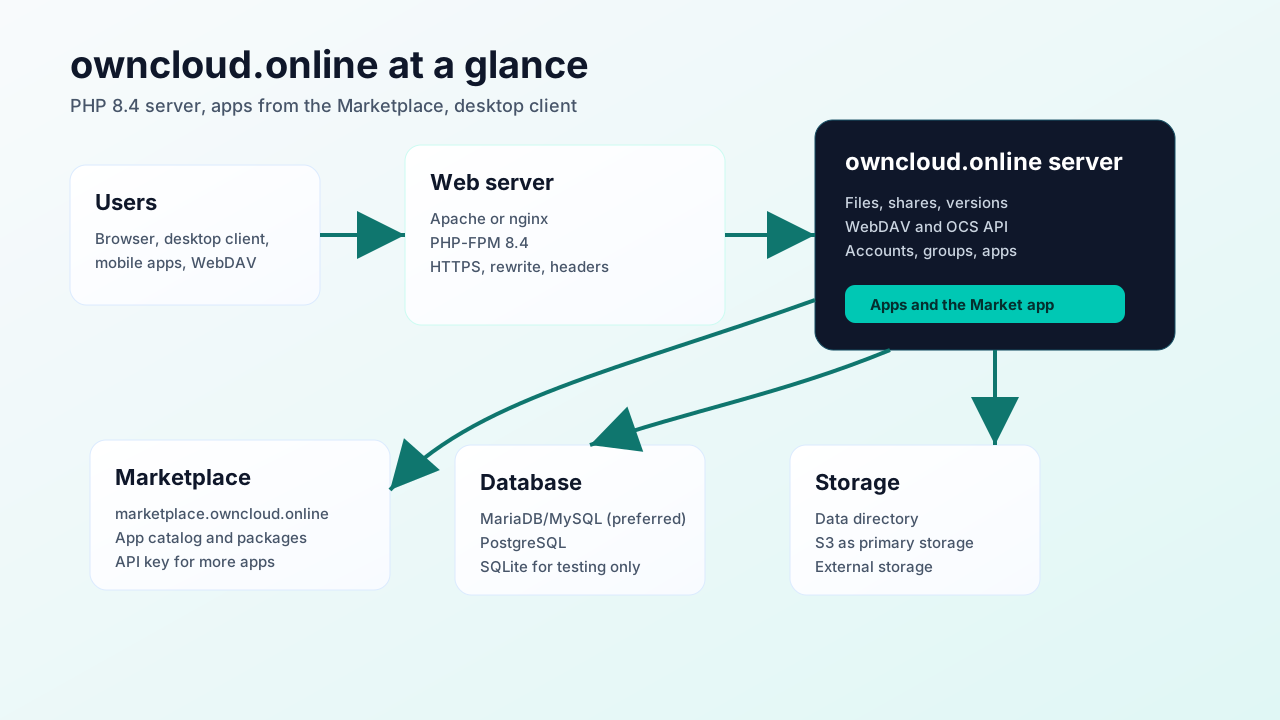
Browsers, the desktop client, and WebDAV clients talk to the web server over HTTPS. The owncloud.online server keeps accounts, shares, and file information in the database and the files themselves in storage. The Market app installs additional apps from the Marketplace.
Scope
This documentation applies to owncloud.online on PHP 8.4 and to the plugins from BW-Tech GmbH. It stands on its own: everything described here applies to this server and was tested on it.
- Server source code: https://github.com/BWTECH-github/owncloud.online
- Desktop client: https://github.com/BWTECH-github/client/releases
- Marketplace: https://marketplace.owncloud.online
The first admin account
During installation, you create the admin account yourself, either in the
browser under Create an admin account or on the command line with
occ maintenance:install --admin-user … --admin-pass …:
Username: admin
Password: <choose your own password>
The name admin is only an example; occ maintenance:install uses it when you
don't specify another one. Even for a test instance, choose a random
password and don't reuse it anywhere else. Test instances tend to become
reachable from the local network sooner than planned, and a password copied
from a guide is on every wordlist.