

Activity
The app records what happens to files and folders: new, changed, deleted, and restored files, shares, comments, tags, and downloads through public links. Each account sees the events for its own files and for files shared with it. Accounts can also get a summary by email.
Availability
Public in the Marketplace, no API key needed. App ID activity,
version 2.8.5. Name in the Market: "Activity".
Requirements
| Area | Requirement |
|---|---|
| owncloud.online | 11.x |
| PHP | 8.4 or later |
| Background jobs | Cron, preferably system cron (see Background jobs). Without cron, no emails go out and old entries are never removed. |
| only for the summaries: working email delivery and an email address in the account |
Installation
In the web interface: open Market from the app menu in the top left corner, search for "Activity", and install the app.
On the command line:
sudo -u www-data php8.4 occ market:install activity
The command downloads the package from the Marketplace, installs the app, and enables it. If the app is already installed and only disabled:
sudo -u www-data php8.4 occ app:enable activity
Setup
The app has no page of its own in the admin settings. Administrators set two values on the command line:
| Value | Where | Default | Effect |
|---|---|---|---|
activity_expire_days |
config.php |
365 |
A background job deletes older entries once a day. |
enable_move_and_rename_activities |
app value of activity |
no |
With yes, the app also records renaming and moving. Two more rows then appear in the personal settings. |
# delete entries after 90 days
sudo -u www-data php8.4 occ config:system:set activity_expire_days --type integer --value 90

# record renaming and moving
sudo -u www-data php8.4 occ config:app:set activity enable_move_and_rename_activities --value yes
Before you shorten activity_expire_days, check whether contractual or legal
retention periods apply.
Background jobs
| Job | Interval | Task |
|---|---|---|
OCA\Activity\BackgroundJob\EmailNotification |
every 15 minutes | sends due summaries. With system cron it works through the whole queue, with AJAX or Webcron it handles at most 25 accounts per run. |
OCA\Activity\BackgroundJob\ExpireActivities |
once a day | deletes entries older than activity_expire_days days |
The emails go out through the instance's email delivery. The sender's local
part is no-reply unless mail_from_address sets a different one.
Command line
# send all pending activity emails now
sudo -u www-data php8.4 occ activity:send-emails

# after moving a database: point links of old entries to this instance
sudo -u www-data php8.4 occ activity:rewrite-legacy-links \
  --old-base-url https://old.example.com/cloud
activity:send-emails ignores the interval the accounts have chosen. Daily and
weekly summaries go out right away as well.
activity:rewrite-legacy-links changes only links to the old host or below the
old webroot. Everything after ? and # stays as it is. The command takes the
new address from --new-base-url, or from overwrite.cli.url without that
option. A second run changes nothing. Such links appear in the RSS feed, in the
API for the clients, and in the stream for entries without a file link.
Usage
Open the stream from the app menu under Activity. Entries are grouped by day, with the filters on the left.
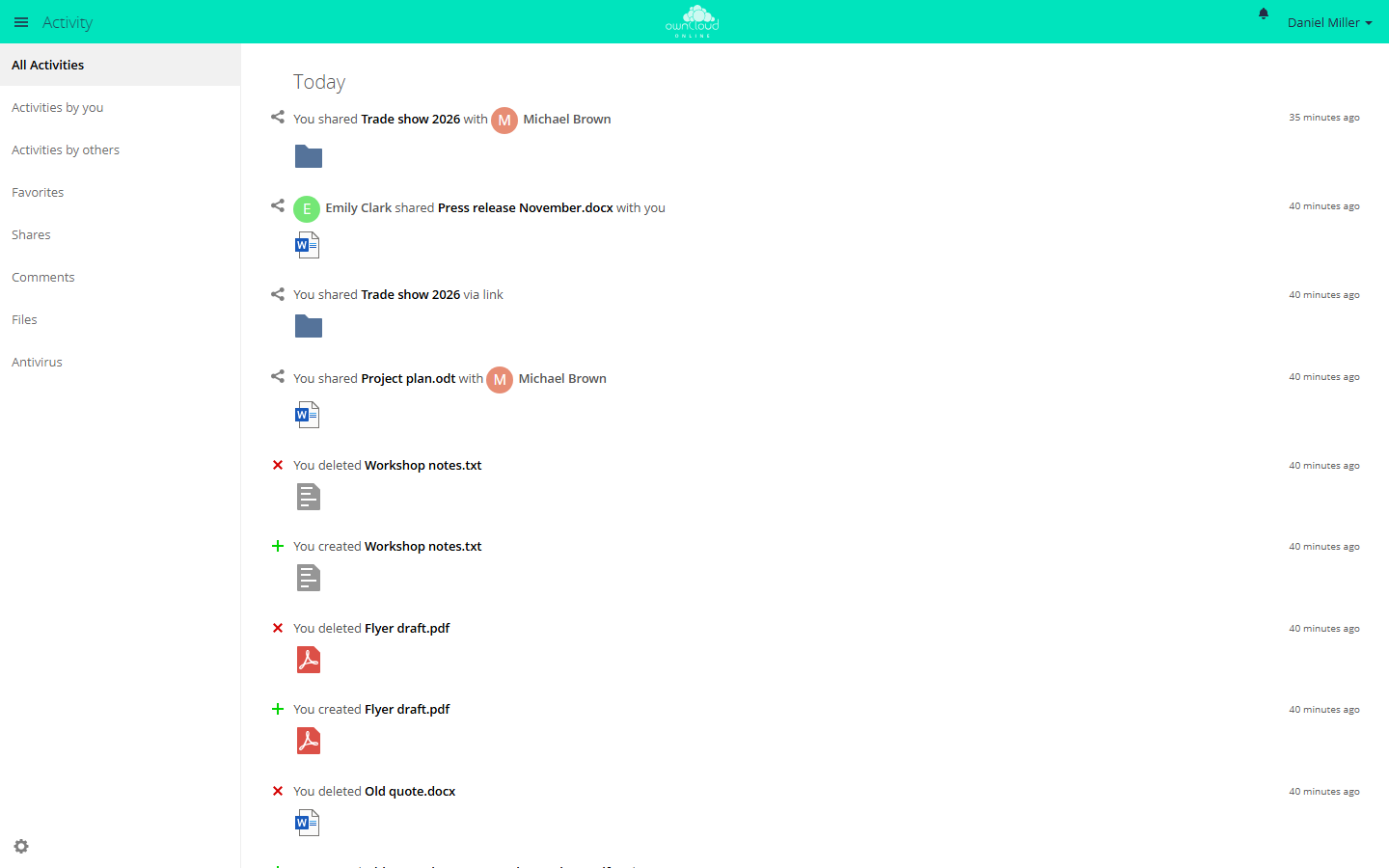
The Activity app lists changes to your files and shares. Filter on the left by "Activities by you", "Shares", or "Files", for example.
| Filter | Shows |
|---|---|
| All Activities | all entries |
| Activities by you | your own actions |
| Activities by others | actions of other accounts on your files and on shared files |
| Favorites | entries for files you marked as favorites |
| Shares | shares with accounts, groups, and through links |
| Comments | comments on files |
| Files | creating, changing, deleting, and restoring |
Other apps add more filters, for example Antivirus.
In the file list, the sidebar of a file or folder has an Activities tab with the entries for exactly that item.
Personal settings
Under Settings → Personal → General, each account decides in the Activity section what appears in the stream and what triggers an email:
- The table has one row per type of event and the columns Mail and Stream. Clicking a column header toggles the whole column; clicking a description toggles the whole row.
- The row "Limit notifications about creation and changes to your favorite files (Stream only)" keeps a busy stream readable.
- List your own file actions in the stream and Notify about your own actions via email include your own actions or leave them out.
- Send emails: As soon as possible, Hourly, Daily, or Weekly. "As soon as possible" also waits for the next run of the email job, which is due every 15 minutes.
If the account has no email address, the section shows "You need to set up your email address before you can receive notification emails."
RSS feed
In the Activity app, the gear icon in the bottom left corner opens the setting Enable RSS feed. A field then shows the address of the feed.
The address contains a secret token. Anyone who knows it can read the feed without logging in, so do not pass it on. Turning the feed off makes the address invalid; turning it on again creates a new one. For disabled and deleted accounts, the feed no longer returns entries.
Limits and notes
- The app records nothing retroactively. Events from before the app was enabled are missing from the stream.
- If the account has no email address, the email job discards the account's pending emails. They are not sent later, even after an address is added.
- The app cannot be limited to groups.
occ app:enable activity --groups …stops with "activity can't be enabled for groups." - The app only records renaming and moving when
enable_move_and_rename_activitiesis set toyes. - The
oc_activitytable grows with every action.activity_expire_dayslimits how long entries are kept. - When you move a database:
activity_expire_daysis stored inconfig.php, not in the database. The cleanup job moves with the database and runs on the first cron run. If the value is missing from the newconfig.php, the job deletes everything older than 365 days. Copy the value over before cron runs for the first time (see Moving to another server).
Troubleshooting
| Symptom | Cause | Fix |
|---|---|---|
| No emails | Cron does not run, email delivery is not set up, or the account has no email address | check cron and email delivery, add an email address to the account, then run occ activity:send-emails |
| The stream stays empty | The events happened before the app was enabled, or the Stream column is cleared in the personal settings | entries are collected from now on; select the checkboxes in the Stream column |
| Renaming and moving are missing | enable_move_and_rename_activities is no |
set the value to yes |
The oc_activity table keeps growing |
The cleanup job does not run | check cron |
| The RSS reader shows "Your feed URL is invalid" | Feed turned off, recreated, or account disabled | get the new address in the Activity app |